TEAM SOLUTIONS
 WORKFLOW SOLUTIONS



 REVIEW TOOL
 PROJECT MANAGEMENT
 TOOLS & INTEGRATIONS
 CLIENT INTERVIEWS




Last updated: October 2026
You always see companies, CEOs, CFOs, and stakeholders talking about processes and workflows. And while it might seem like senseless corporate talk, every process was created to help humans work together.
Because at the end of the day, it doesn’t matter how well you work as an individual if your design approval process is broken. Yes, brand and product might love your design, but then legal will change a claim, and half of the layout is ruined.
So, today, let’s discuss what a design approval process should look like, so it becomes more than just corporate talk.
The stages of the design approval process
A design approval process usually runs in six stages: brief, concept, internal review, stakeholder and client review, revisions, and final sign-off. There are a few things that determine how quickly you’re moving through them. Mostly, it’s details like who approves which decision, which reviews run in parallel, which designs can skip the full chain, and what happens when the approver goes quiet.
The stages themselves are covered in our guide to the review and approval process, so I won’t repeat them here. This article is about the part most process docs skip: making the stages actually flow.
Need the stages first?
Our guide breaks down all 7 stages of the review and approval process, from the brief to the final sign-off.
Map your design approval workflow before the first draft
Usually, you start thinking about approvers after the design is ready. And most of the time a designer does it. They send the asset to their manager, who then remembers a few people who might want to look at it. Then, those people resend the asset a few other times. A week later the feedback is still coming, and it’s about the Monday version.
The fix is a routing map: a simple table that says, for each type of asset, who approves it, what has to happen in order, and what can happen at the same time. You make it once, and then every new request just picks its row.
Here’s a starting point you can adapt:
There are two rules that make the map work.
One approver per decision. A design contains several decisions: is it good, is it on brand, are the claims correct, can we legally say this, does the business want it. Each of those has exactly one owner. Everyone else who looks at it is a reviewer, and the difference matters more than people think (we broke it down in our creative review process questions).
One final approver per asset. Several people can approve their own slice, but only one person gives the final yes. If two people share the final say, it quickly turns into a debate club.
If your team runs whole campaigns through several departments, the same map scales up into a marketing approval workflow. Start with your three most common asset types, then add the rest over time.
What order design approvals should run in
Depending on how well your process is built, six approvers might mean six weeks or six hours. The design, deadlines, and people will be the same, but the order changes the duration drastically.
When approvals must run one after another
Some approvals depend on each other. There’s no point in the client approving a layout the creative lead is about to change, and no point in prepress checking files that might still get a new headline.
The rule of thumb: if one person’s decision can change what the next person is looking at, they go in sequence. Creative before client. Copy and claims before final artwork. Final artwork before production.

When approvals can run in parallel
Everything else can run at the same time. Brand, product, and legal usually check completely different things on the same file. Brand looks at the logo and colors, product at the specs, legal at the small print. Making them queue behind each other adds days and gives you nothing.
So send it to all three at once, with the same deadline, and collect their decisions in one place. If you do only one thing from this article, do this one. Sequential-by-default is the most common reason a “quick review” can take up to two weeks.
Bring legal and compliance in early, not last
Legal at the very end is the classic trap. Everyone polishes the design, the client loves it, and then compliance flags a claim that changes the layout. Back to round one, with a client who already said yes to something that no longer exists.
If an asset has regulated content (health claims, pricing, financial terms, allergen info), legal sees the copy at the concept stage, or at the very least before the client does. Their changes are cheap early and expensive late.
Fast lanes: which designs skip the full chain
Now, my anxious children, I’m going to say something that will scare you. You do not need to run everything by six approvers. People hired you because they trust you and your judgment. And taking each Instagram story through legal quickly turns into a “boy who cried wolf” type of horror. They stop paying attention, and when something truly important comes up, it doesn’t get the attention it deserves.
Decide upfront which assets get a fast lane. A useful split:
- Full chain: new campaigns and key visuals, packaging, anything with claims or legal text, anything printed in volume, anything client-facing for the first time.
- Fast lane (creative lead only): resizes and format variations of an approved design, social posts built from an approved key visual, internal materials, unchanged reprints.
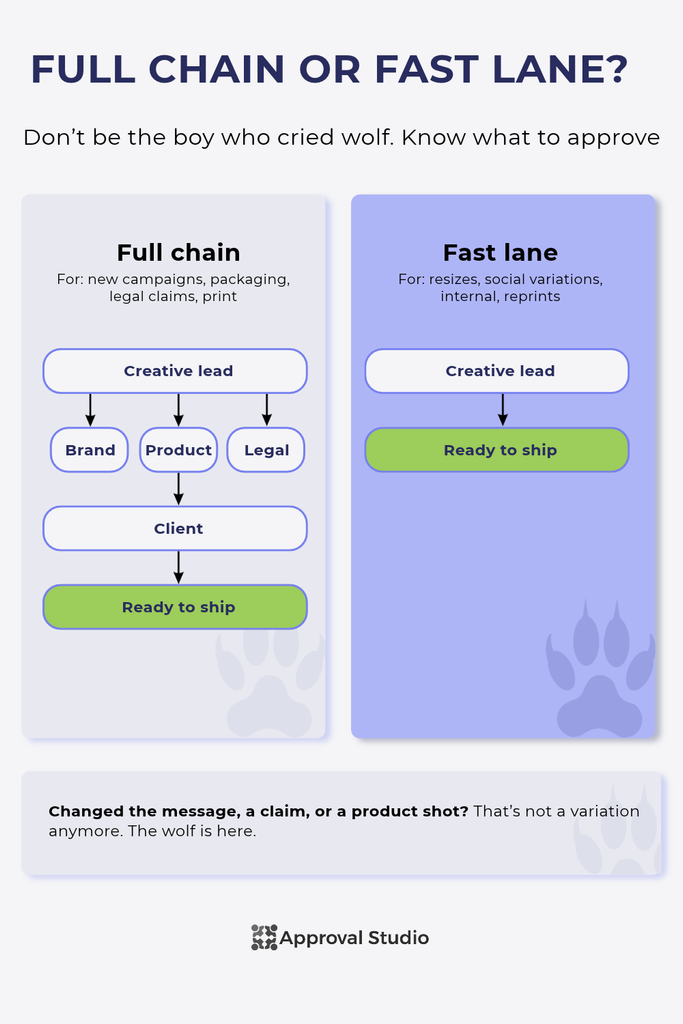
What protects the fast lane is the approved master. Once the hero visual has gone through the full chain, its twenty resizes don’t need a fresh round of brand opinions each. The moment a variation changes the message, the claim, or the product shot, it’s not a variation anymore and goes back to the full chain.
When the approver is the bottleneck
Sometimes, you do everything perfectly, route through approvers like a knife through butter, and make changes before the requester blinks, but nothing is enough. Well, you must know it’s not you; it’s them. The approver is usually also a person, and people get stuck pretty easily. They can go on a holiday, get busy, or have opinions about things they shouldn’t. Here’s what you should do in each case.
The approver is out of office
The problem: the design is ready, every reviewer has signed off, and the final approver is on a beach for two weeks.
The fix: name a backup approver at intake, right next to the main one. Then it’s not a favor to ask, but a predetermined plan. If you run approvals in review and approval software, check that an admin can reassign the approval step or skip it, so a holiday doesn’t freeze the whole project. (In Approval Studio, admins can do both. Yes, I’m biased.)


The approver never responds
The problem: it’s not Halloween, but the ghost is here. The approval request is just sitting there, between 200 other emails.
The fix: give the approval step its own due date, separate from the reviewers’ deadline, plus an escalation rule everyone agreed on upfront. For example: no decision after two working days goes to the backup approver. You can also automate reminders through the tools your team already uses, so you’re not the one sending “just checking in” for the third time. (Also an Approval Studio feature, well, if this isn’t a nice coincidence).
The approver overrules someone else’s area
The problem: legal approved the claim, and the final approver rewrites it because it “sounds clunky.” Now legal has to review again, and nobody’s happy.
The fix: the final approver decides whether the design ships, not whether the legal text is correct. If they want to change something in another person’s area, it goes back to that owner, not straight to the designer. Put that rule in writing once, and it saves a lot of awkward conversations.
“Approved, but…”
The problem: the approver says yes, but also wants the logo slightly bigger and the date changed. Is that a new round? Who checks it?
The fix: agree on what “approved with changes” covers. Typos, dates, small text fixes: the designer makes them and the approval stands. Anything that changes the layout, the message, or a claim: that’s a new round. Without that line, “approved with changes” goes into round six when it was supposed to stop at two. (You’re not going to believe it…That’s also an Approval Studio feature).

How to measure your design approval process
We’ve discussed the annotation rules pretty extensively in our design feedback guide. And the main rule is that anything that goes “It feels x” is not great feedback. Same goes for evaluating your design approval process. “Feels faster” is as good a metric as “Feels off”.
In reality, routing changes are easy to measure. When Google introduced a structured, partly automated approach to its engineering design reviews, median time-to-approval dropped by 25% across 141,652 approved documents (Google Research, 2023). Sure, those are engineering design docs, not banners, but the principle travels: once the process has structure, you can measure it and improve it.
Five numbers worth tracking for your design approval:
- Time to approval: from first draft sent to final sign-off. Track the median, not the average, so one cursed project doesn’t skew everything.
- Waiting time vs working time: how long the design sat waiting for someone, compared to how long anyone actually worked on it. This is the number that shows whether your routing is the problem.
- Time per approval step: which step holds things up the longest. If it’s always the same person or department, you’ve found your bottleneck.
- Revision rounds per asset: one or two is healthy. Regularly hitting three or more usually means the brief might be wrong
- Fast-lane share: what percentage of assets went through the fast lane. If it’s close to zero, your fast lane exists on paper only.
Measure for a month before you change anything, then again a month after. Now you have proof if anything is “off”.
Design approval workflow template
To make it all easier, we’ve created a little template that you can use as a skeleton for your design approval workflow.
For the routing to move smoothly, it has to meet these criteria:
- The asset type has a row in your routing map.
- Every decision has one approver and one backup.
- There’s one final approver, named before the first draft.
- Independent approvals (brand, product, legal) run in parallel.
- Legal and compliance see regulated content before the client does.
- The fast-lane rules are written down, and this asset either qualifies or doesn’t.
- Every approval step has a due date and an escalation rule.
- The final approver changes things in other people’s areas only through those owners.
- “Approved with changes” has a written limit.
- Time per step and revision rounds are tracked monthly.
Final thoughts
A slow design approval process is almost never about slow people. It’s about routing: approvals queued one after another when they could run side by side, legal showing up at the finish line, every resize going through six people, and no plan for when the approver is on a beach. Map it once, decide what runs in parallel, give small things a fast lane, and week three becomes day three.