TEAM SOLUTIONS
 WORKFLOW SOLUTIONS



 REVIEW TOOL
 PROJECT MANAGEMENT
 TOOLS & INTEGRATIONS
 CLIENT INTERVIEWS






Post is also avalible in:


Last updated: April 2026
Once, we were playing a game with a few of my friends in marketing. We decided to take a spin on Never Have I Ever. And when I was asked to name a universal experience for my turn, two things came to mind. One was a family pet from when you were little, after which your parents seemed to have sworn off any pets. Another is the frustration from a message at 10 pm, saying that there’s something wrong with the copy, and the worst screenshot you’ve ever seen attached to it. Had I chosen the latter, I would’ve won the game. Unfortunately, though, I underestimated how similar everyone’s job is, especially in marketing.
So, if you’re the one who also experienced the second option (and quite a lot, as well), welcome to my little article on something that will make your life better: a marketing approval workflow.
What is a marketing approval workflow?
Think of it as a paper trail with purpose. Every piece of content (like an ad, a landing page, a social post, an email) moves through a sequence of checkpoints before it goes live. Each checkpoint has a designated reviewer, a clear scope of feedback, and a defined outcome: approved, rejected, or revised. Usually, teams use a special marketing approval software to make the entire process easier.
The keyword here is pre-defined. A workflow isn’t something you improvise when things go wrong and hope it’s going to fix everything. It’s the thing you build so that things don’t go wrong in the first place.
Why most approval processes are broken (and who’s to blame)
Let’s be honest: most teams don’t have an approval workflow (and we didn’t either at first). What happened was a chaotic game of luck: will we screw up or not?
Here’s how it used to play out. Someone finished a piece of content and sends it over via Slack (or email, or a comment in a Google Doc, or a WhatsApp message, pick your poison). The recipient forgot, was busy, or wrote it down on a piece of paper that got lost. A reminder went out. Then another. Then someone finally looked at it in panic the night before the deadline and had opinions. Really strong ones. The kind that requires a complete rewrite at 10 pm.
So who’s to blame? Honestly, no one and everyone. The problem isn’t that the team is irresponsible. The problem is that there’s no system. When there’s no system, people fill in the gaps with improvisation, and improvisation at scale will lead to occasionally great work with some headaches in between.
Common reasons creative approval processes break down
- No single owner. When everyone is responsible, no one is. If it’s unclear who has the final say, feedback loops back endlessly, and nothing gets approved on time.
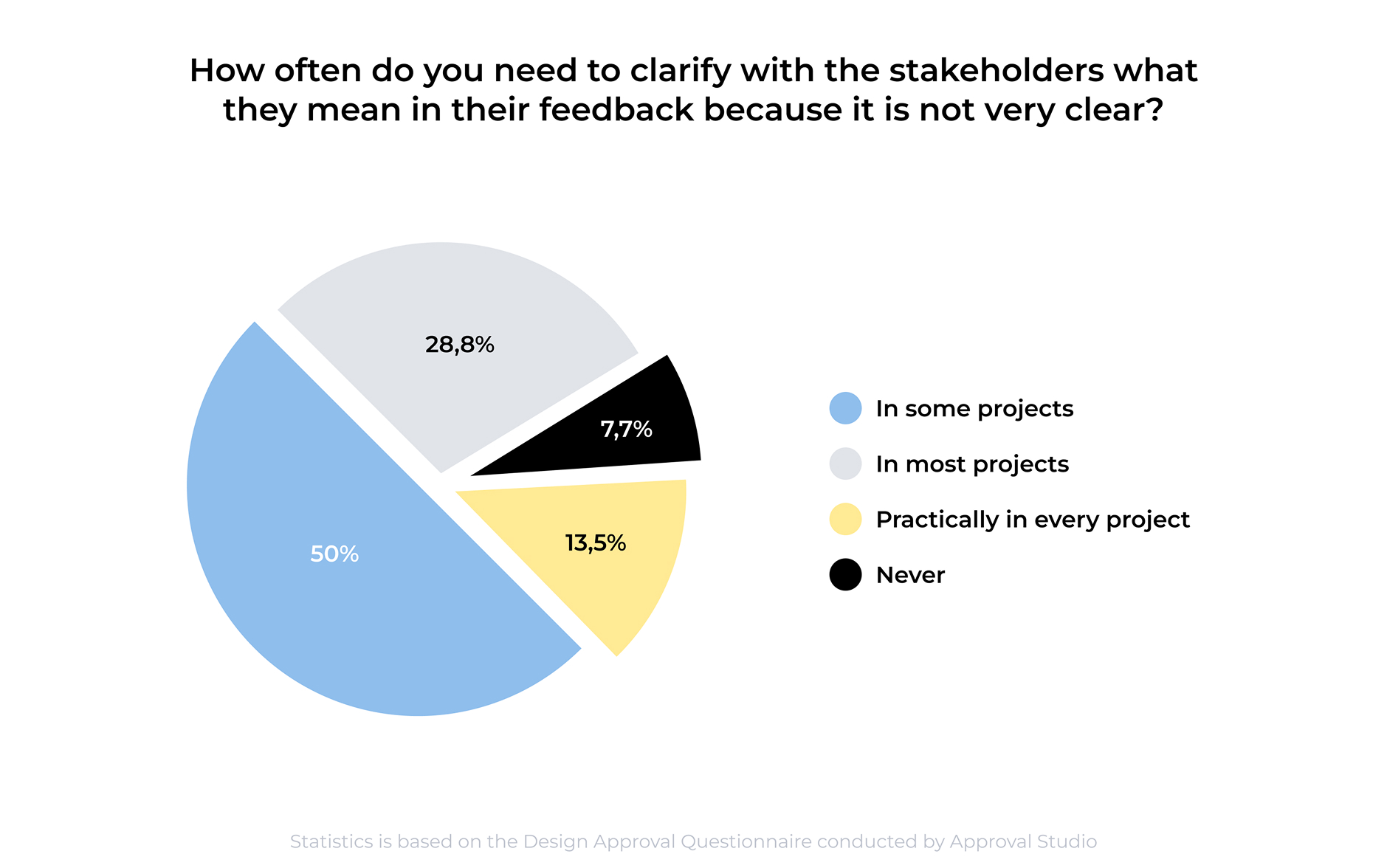
- Feedback without context. “This doesn’t feel right” is not actionable. But without a defined review scope, reviewers eventually default to that kind of feedback, because they’re reviewing everything at once instead of their specific piece of it. And it’s not just us. According to Approval Studio’s Design Approval Questionnaire, over 90% of marketing and design teams regularly need to chase stakeholders for clarification on their own feedback.
- No visibility into status. Is it being reviewed? Was it approved? Did someone forget? Without a shared system, the asset’s status lives in someone’s head, and you have to interrupt them to find out.
- Too many cooks. Involving twelve stakeholders in every piece of content doesn’t make it better. It makes everything beige. Approval workflows help define who reviews what and, just as importantly, who doesn’t.
The good news: none of this is hard to fix. It just requires building the right structure.


The 5 steps of a working marketing approval workflow
So, how did we fix our chaotic marketing approval workflow? Well, a lot of trial and error led me to a very simple solution. I should not overcomplicate it. What I should do is to set super basic rules that are easy to follow, that will eventually become what smart people call “a consistency.”
1. Define what needs approval (and what doesn’t)
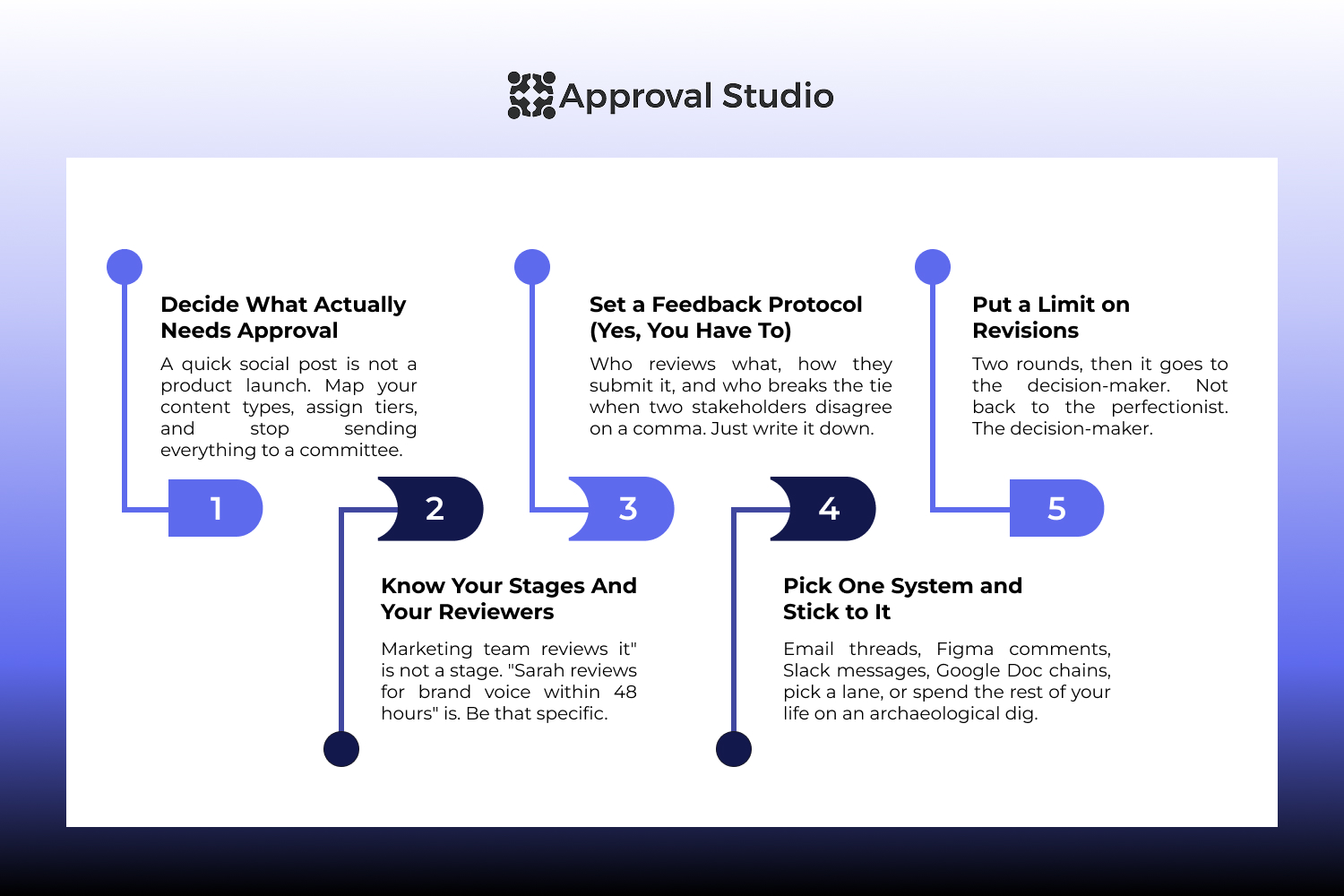
It’s the internet, not every piece of content needs to go through a five-stage review. People forget stuff, and a quick social post is not the same as a product launch campaign. Start by mapping your content types and assigning an approval tier to each.
High-stakes content (anything that touches legal, brand compliance, brand reputation, or significant spend) gets the full treatment with multiple-stage reviews at every step. Routine, lower-risk content can move through a lighter process, or in some cases, be self-approved by the content creator.
Getting this right from the start saves everyone time and prevents the workflow from becoming a bottleneck for things that never needed a committee in the first place.
2. Map the stages and assign reviewers
Once you know what needs approval, define the stages it will pass through. A typical sequence might look like: content creation → internal review (copy, design) → stakeholder review → legal/compliance check → final sign-off → publish.
The number of stages depends on your team size, content type, and industry. What matters is that each stage has a named reviewer, a clear responsibility, and a deadline. “Marketing team reviews it” is not a stage. “Sarah reviews for brand voice within 48 hours” is.
3. Establish a feedback protocol
This is the step most teams skip, and it’s the one that causes the most late-night messages.
A feedback protocol answers: What kind of feedback is expected at each stage? How should it be submitted? What happens when feedback conflicts?
For example, the copy editor reviews for clarity and grammar and has a set of rules on how to do so. The brand manager reviews for tone and visual consistency, not legal language. The legal reviewer checks for compliance, and doesn’t give their opinions on the “catchiness” of the headline. When reviewers know the scope of their role, feedback becomes faster, more useful, and far less likely to spiral.
It also helps to have a simple rule for conflicting feedback: designate one person as the tiebreaker. It prevents the workflow from stalling while two stakeholders debate comma placement.
4. Choose a single system to track everything
When you have email threads for stakeholders, comment chains in Google Docs for writers, and Figma comments for designers (for visual and website proofing), your workflow becomes useless. Now, you’re leading an archaeological dig site for future you, trying to figure out which version was approved and by whom. This isn’t a hypothetical.
82.7%
Respondents said they’d lost feedback or important project information through the medium they were using.
Source: Approval Studio Questionnaire — link↗
Pick one place where assets live, feedback is left, and approvals are recorded. This is where purpose-built online proofing software earns its keep, but even a well-structured project management tool is better than scattered conversations.
The goal is simple: anyone on the team should be able to look at any asset and immediately know its status, who last reviewed it, and what needs to happen next. And only then comes the compliance and audit trails. It’s really not about how useful it is for the corporate, but about how many people you have to ask around before you know what to do today.
5. Build in revision limits and escalation rules
Endless revision cycles are one of the most common workflow killers. Without limits, an asset can bounce between “needs changes” and “almost there” indefinitely. A perfectionist in me always wants “just a little more”.
So, to not annoy everyone around, set a clear maximum number of revision rounds before escalation. If an asset hasn’t been approved after two rounds of revisions, it goes to the decision-maker who has final authority, rather than cycling through the same feedback loop again.
Escalation rules also help when reviewers are unresponsive. Define what happens after a missed deadline: automatic reminders, escalation to their manager, or a default “approved” if no objections are raised within a set window. Whatever you choose, write it down, so there’s no ambiguity when it actually happens.
Common mistakes to avoid
Even teams that have approval workflows in place often run into the same handful of problems. God knows, we do. And sometimes we go through the project flawlessly, and sometimes we have issues. I’ve learned over time that some actions “flag” the project for trouble early on, and they’re not what you think.
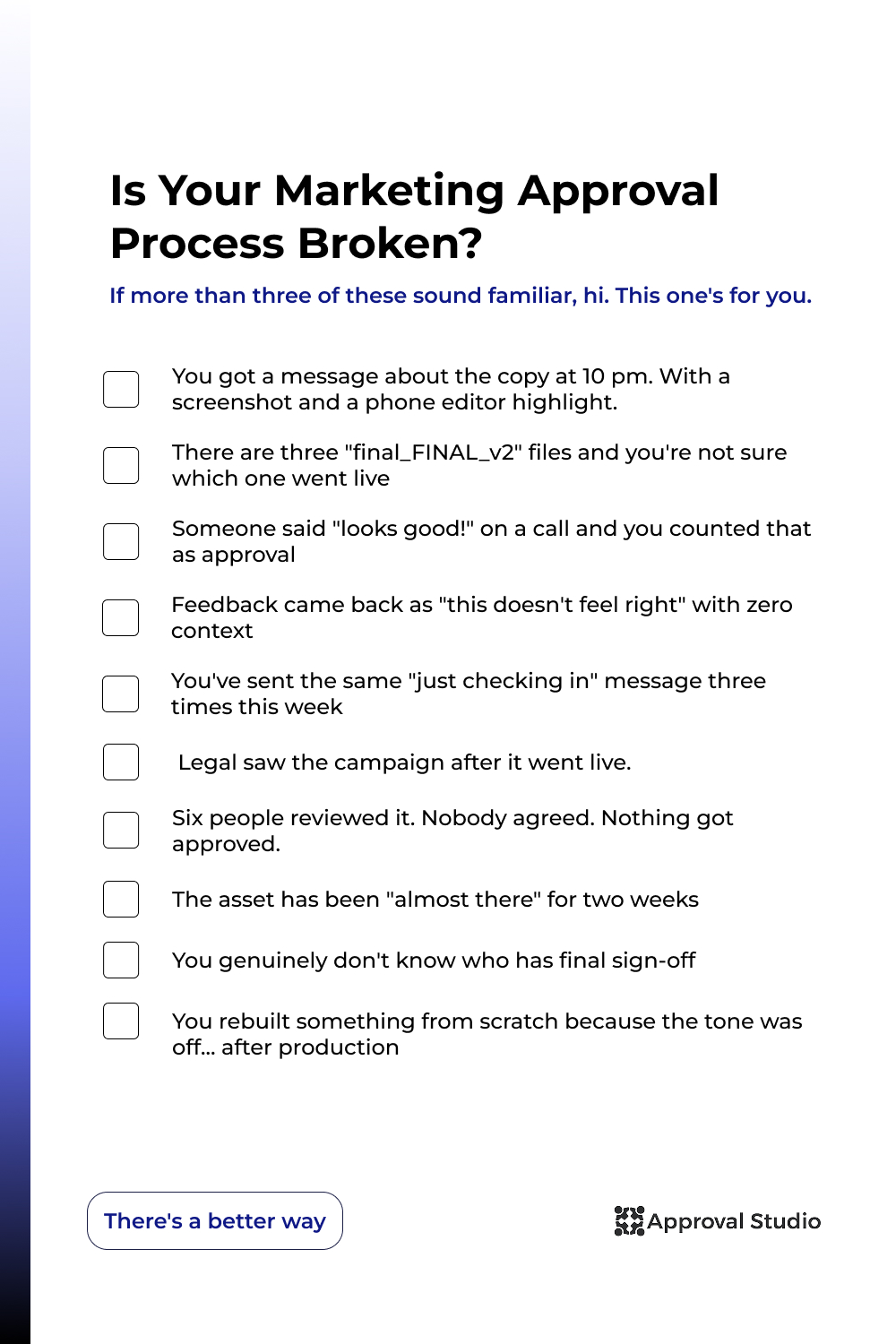
The biggest one is starting the approval process too late. By the time you have a physical copy of the project and realize the tone of voice is completely off, you’ve already burned time and budget on something that needs to be rebuilt. Approval alignment should start at the brief.
Just as common is treating approval as a single group event. One big meeting where all departments give feedback at once sounds efficient. It isn’t. It’s hard to track, overwhelming for the person receiving it, and expensive to fix because conflicting opinions arrive simultaneously with no clear hierarchy. You know, staged reviews were made for a reason.
Another issue is that people confusing a comment and an approval. Especially if the approval process happens elsewhere. Repeat after me, “I love this” is not approval, but a subjective opinion that has the right to exist after formal sign-off.If your workflow doesn’t require an explicit action to mark something approved, disagreement is just a question of time.
And the last silent killer is building a workflow and then quietly abandoning the parts that no longer fit when things change. The team grows, the tools change, the content volume doubles and instead of updating the process, you just ignore inconvenient parts. Approval workflows are that one thing everyone makes you do, and then you discover they actually make your life better.
What to look for in marketing approval software
You don’t need specialized software to run an approval workflow. However, the right tool can be a great nudge toward a workflow that leaves everyone happy, including the higher management. Here’s what actually matters when evaluating options:
Centralized asset management. All files, versions, and feedback should live in one place. If you’re toggling between tools to piece together the status of an asset, the software isn’t doing its job, and your team will just stop using it.
Clear status visibility. At a glance, you should be able to see what’s in review, what’s approved, what’s been rejected, and what’s overdue. This is what replaces all the 8 pm and am update messages. So, the features you should see are dashboards, status indicators, and reporting systems.
Structured feedback tools. The ability to leave comments directly on an asset is the whole point. You should be able to pin your feedback to a specific line of copy, a section of a design, or a timestamp in a video, so that reviewers stop sending screenshots. Look for annotation and markup features for online proofing.
Configurable workflow stages. No two teams work exactly the same way. And a great marketing approval software should allow you to tweak the workflow it offers to match yours. Good software lets you define your own stages, assign specific reviewers to each, and set deadlines without forcing you into a rigid template.
Audit trail. Who approved what, when, and in which version? Listen, yes, this matters for legal compliance. However, sometimes you also look at the final design, thinking who approved this, and you just have to know it was you, two weeks ago at 10 pm. That’s why the copy says “Deer users”.
Integration with your existing tools. The best review and approval software is the one your team will actually use. Look for integrations with the tools already in your stack: design tools, project management platforms, and communication apps, so the workflow fits into how your team works, and you won’t need to change all the tools.
How to set it up in Approval Studio
If you’re ready to stop the late-night messages and actually build a workflow that holds up, Approval Studio is worth a look. I’ll let you take a peek into our process to prove it.
First, define your workflow stages. In the workflow settings, add the stages your content will move through. For example, we have Team Review, Manager Review, and Final Approval. For each stage, assign the relevant reviewers (who are part of the team or not) and set a deadline. You can build templates for different content types so you’re not configuring from scratch every time.
Then, you set up your project. It can be a bigger project, like your latest campaign, or a smaller one, like a set of visuals for the article. Then you upload your technical task or reference document and assign the task to the designer or a writer.
The beauty of the platform is that it supports a wide range of file types, so whether you’re working with a PDF, an image, a video, or a document, you can approve anything that a marketing campaign needs.
And then, just work. The workflow is triggered by actions that you set up, so for example, as soon as your writer uploads a document with the page text, a review task will be automatically assigned to the responsible person. Approval Studio lets you set permissions by role, so reviewers only see and access what’s relevant to them. And if we need a second thought, there are external reviewer (like clients, legal teams, executives) who can review and approve without needing a full account.
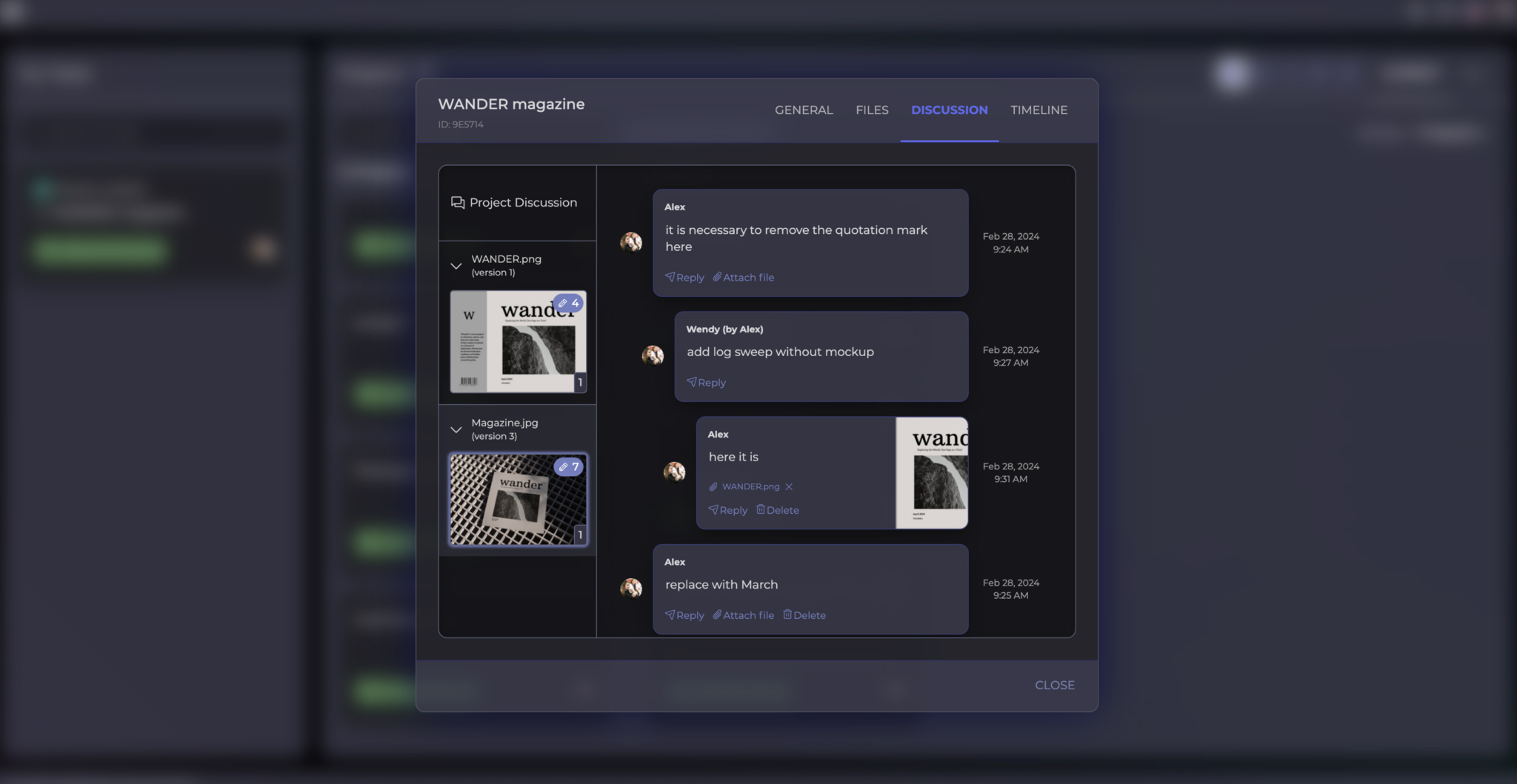
Then, a review starts. Reviewers receive a notification and can leave annotated feedback directly on the file (no screenshots, yay!) Feedback is visible to everyone in the stage, making it easy to resolve conflicting comments before they become a problem. If a reviewer is satisfied, they mark the asset as approved. Once all required approvals for a stage are collected, the asset moves automatically to the next one. You can track who approved, when, and with which comments for projects or assets.
And then you publish. When the final approval is in, you have a complete audit trail: every version, every piece of feedback, every approval, timestamped and stored. Everyone is happy, your headache is gone, KPIs met, and you’re ready to go headfirst into the new project.
Conclusion
I would never go back to how it was. Even on the projects where the workflow feels like extra steps, I know exactly what happened, who approved what, and why, and that’s worth more than any shortcut.
Nothing in this article will eliminate every headache in your marketing process, no matter how much I wish it did. But it does help with most of the preventable ones. And the preventable ones are usually the ones keeping you up at night.
If you also want to see what this looks like inside a real team, try Approval Studio free for 2 weeks, no credit card required.