
 TEAM SOLUTIONS
 WORKFLOW SOLUTIONS



 REVIEW TOOL
 PROJECT MANAGEMENT
 TOOLS & INTEGRATIONS
 CLIENT INTERVIEWS




Post is also avalible in:


Last updated: June 2026
The packaging design industry must be one of those that are easier just to let go and go with the flow than to study. The sheer number of people, teams, and processes involved in a single chapstick box (and I’m not even mentioning the chapstick itself) can scare people away from the industry.
45,8%
of FDA food & beverage recalls of 2025 were caused by allergen mislabeling, a result of poor packaging design proofing.
Source: Esko, 2025 link↗
But it shouldn’t scare you, my friend. I will help you understand it, and as a little sweet treat, we will discuss some tools to help you make it make sense.
Packaging design workflow in short
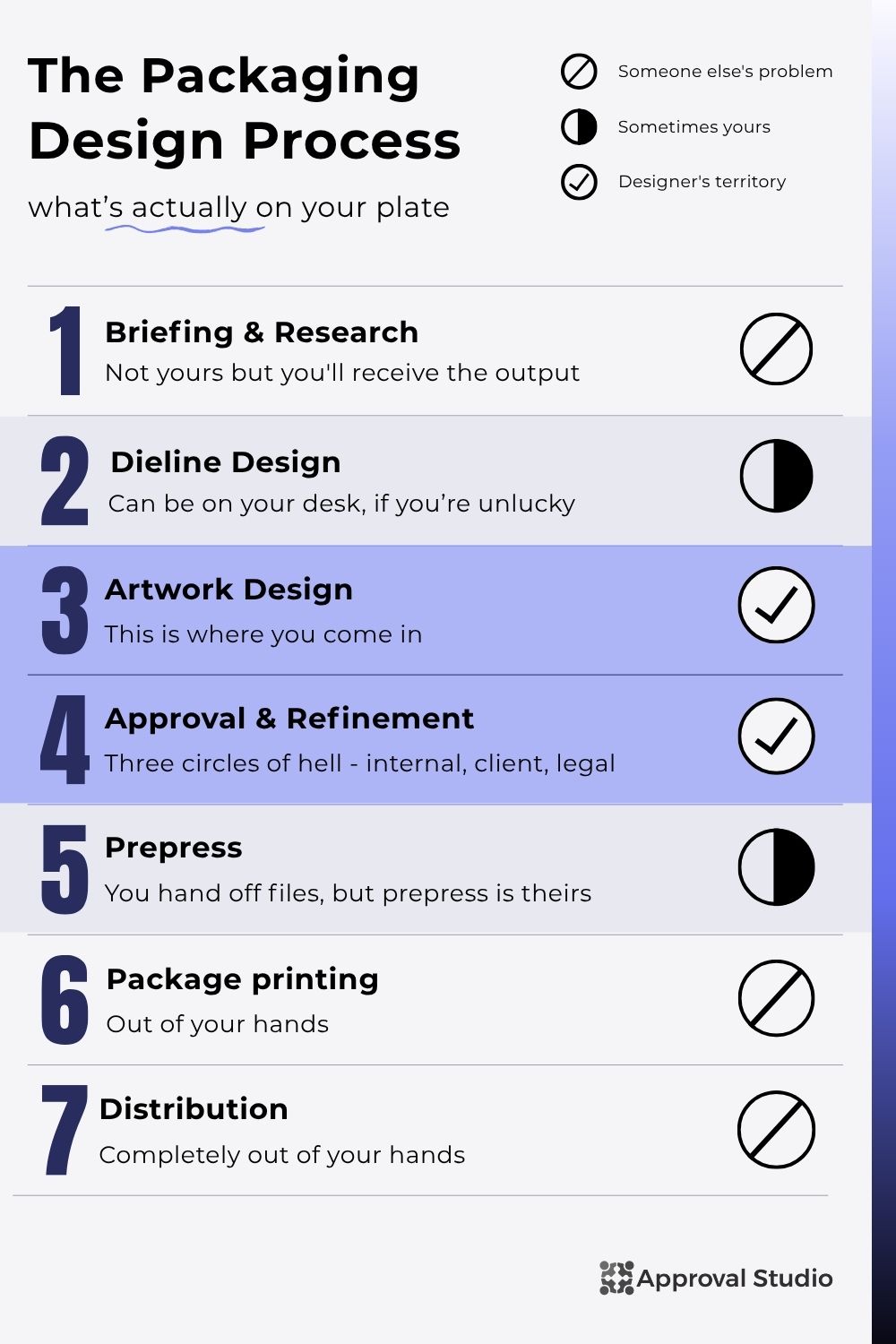
We’ve discussed all of these processes in our How Packaging Design Works article, if you want to go into more detail. However, today we are going to quickly go over more designer-facing parts. For the designer, the real work starts in the Artwork design part, where all the briefing and (sometimes) dieline designs are given to you with a message, “Make something pretty!”
After the design is ready, you start the endless process of approval and refinement. The design usually goes through the first circle of hell (internal approval), after which you create a visualization and enter the second circle of hell (client approval), to then get into the last and worst one (legal approval). After all that, the design is quickly prepared for prepress and goes into the free swimming out of the designer’s reach (like the latter stages of prepress, printing, and distribution).
Packaging design software types
But we are talking about packaging design tools today, so let’s split up the stages slightly differently by the end goal of each (it will make sense in the end, I promise). Look at the list above, which three intermediate goals do you think there are? Take a moment to think.
The moment passed too fast because I know you looked. The goals are: create structural design, create graphics/artwork, and review&approve everything. Sure, these three are not done in order; however, they best represent how the designer’s work is organized. And additionally, that’s the best way to organize your packaging design software.
Again, for a successful packaging design workflow, you need these packaging design tools:
- Specialized structural design software for creating dieline designs, 3d mockups, and preparing the artwork for prepress.
- Packaging artwork software for creating a design itself, but it has to be industry-acknowledged with correct formats and specifics like layers, colors, etc.
- Packaging proofing software that supports the format you work with and allows for on-screen feedback, commenting, version management, and approval control.
And if your team’s work runs past the box into ads, social, and other campaign assets, that same sign-off layer is worth setting up with dedicated marketing approval software; the review step matters just as much once creative leaves the design stage.
Oh, but how about we use one tool for it all? You might think that that will be cheaper, and more focused because you won’t need to remember many passwords and have one single workspace. Unfortunately, you are wrong. The teams that do try to pack it all into one software end up sacrificing the quality of at least one process, and in packaging, that usually means the approval one.
| Tool | Capterra | Best For | Key Strength | From | Trial |
|---|---|---|---|---|---|
| Impact CAD | Not rated | Agencies handling complex structural and dieline design | Production-grade structural CAD and dieline creation | Custom | Demo on request |
| Pacdora | 3.5 (2 reviews) | Quick 3D previews and dieline templates | Browser-based 3D mockups with a large template library | Free; paid from ~€16/mo | 7 days |
| Blender | 4.7 | Custom, personalized 3D visualizations | Free open-source 3D modeling and rendering | Free (open-source) | N/A |
| Adobe Illustrator | 4.8 | Industry-standard packaging artwork | Precise vector artwork built for print and prepress | $22.99/mo | 7 days |
| Adobe Substance 3D | 4.6 | Photorealistic 3D mockups | Realistic material and texture creation for renders | $59.99/mo | 30 days |
| CorelDRAW | 4.5 | Illustrator alternative for artwork | Full vector suite with a perpetual-license option | $249/yr (~$20.75/mo) | 15 days |
| Canva | 4.7 | Small brands and concept work | Drag-and-drop design with a capable free tier | Free; Pro $15/mo | 30 days |
| Approval Studio | 4.8 | Packaging proofing and multi-stage sign-off | Purpose-built creative proofing with side-by-side compare | $60/mo | 14 days |
| PageProof | 4.8 | Barcode verification and compliance | Enterprise-grade security with compliance checks | $249/mo | Yes (unspecified) |
| Ziflow | 4.8 | Enterprise workflows | Visual workflow automation across approval stages | Free; then $199/mo | 14 days |
| GoProof | 4.3 | Adobe Creative Cloud integration | Native Adobe CC plugin for in-app proofing | $129/mo | 14 days |
Final thoughts
Packaging design software should be considered in a workflow to be actually useful and not waste anyone’s money. The tools that help you build a box, the tools that help you make it beautiful, and the tools that help you get everyone to agree it’s ready to print are three genuinely different types of software solving three genuinely different problems.
Sure, I also want to have everything in one document to not lose it. But eventually that document becomes so hard to work with, and then, after page 1000, it loads for a minute. So, no, you cannot make all the internal, external, and legal feedback in ImpactCad because a creative director will lose their mind.
Pick one from each column. Make sure the handoffs are clean. And when the seventh round of revisions comes in via a 47-reply email thread with three different “final” files attached (which it will, by the way, even I do that sometimes), you’ll understand exactly why the approval software line item exists on the budget.
Good luck. The chapstick box isn’t going to proof itself.
