TEAM SOLUTIONS
 WORKFLOW SOLUTIONS



 REVIEW TOOL
 PROJECT MANAGEMENT
 TOOLS & INTEGRATIONS
 CLIENT INTERVIEWS




Last updated: November 2026
One of the worst feelings in the corporate world is when you have to use a tool that doesn’t satisfy your vision of work to the fullest. Imagine a company pays for a yearly app subscription, and three days into it, your usual way of working has to become a workaround. Sure, that’s what trials are for. However, a trial doesn’t always encapsulate the workflow as much as you would like it to, and problems start happening very quickly.
But that’s only part of what we’re going to discuss today. Our main topic is an amazing website review tool called BugHerd and its alternative for marketing teams. You might have already guessed why the tantrum at the beginning, but if not, stay tuned.
Short version: BugHerd is a website feedback tool that turns comments into developer tasks. Approval Studio is a website review tool for marketing teams, where you mark up a website the same way you’d mark up a brochure, then get it approved. Just a quick note, though. I’m not a neutral party, so you have the right to take what I’m saying with a grain of salt. However, history shows that I have a pretty good eye for when a tool works for your case (check all of our alternative articles to see).
What is BugHerd?
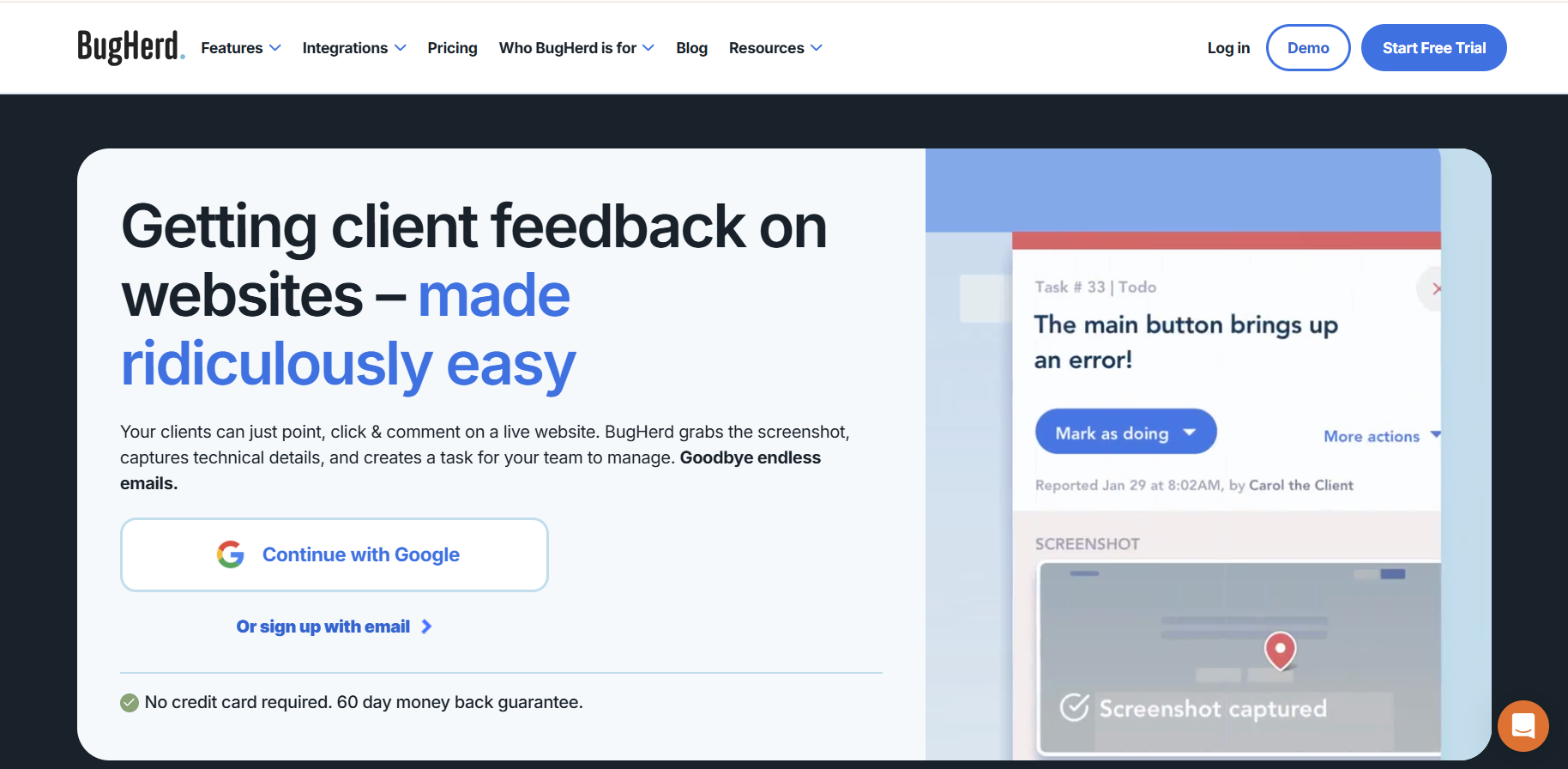
BugHerd is your classic feedback tool, but built specifically for websites (at least originally; we’ll get into that). It has all the beloved review tool features like commenting in context, clients not needing an account to leave feedback, discussions, etc. However, being made for developers who got sick and tired of the “it doesn’t look like that on my laptop”, BugHerd introduced a bunch of other crucial features into the set, which we’re going to discuss later. Now, the tool is not website-only anymore and supports PDFs, images, and Figma designs. And we’re going to discuss how well it does that and who benefits from a system like BugHerd.
BugHerd features
As a rule, we go through the three main categories people usually look for in an online proofing tool, and score each candidate on each. Usually, these categories consist of review & proofing, version management, and integrations. For continuity reasons, the categories are going to stay the same, but we will focus mostly on the website review features.
Review & Proofing
As I said before, BugHerd can come across as a traditional review tool, but it was made specifically for websites, and it shows in its feature set.
- JavaScript snippet or browser extension for adding BugHerd to your website
- Pin feedback to a specific element
- Automatic screenshot with every comment you make
- Includes technical data (browser, OS, screen resolution, etc.)
- Client access through a link without an account or login
- Automatically created trackable tasks
- Kanban board for tasks
Honest opinion: It seems like one of the best ways for a manager to leave any type of feedback. A gorgeous “set up once and use forever” system, and the technical information makes it so much easier for the developers to understand why the problem is occurring. But, as I said, it’s great for managers. As a client, it might be annoying to open a separate task-creation window just to say you want to change the color. So, for me, it scores an “internal heaven” out of 10.
Version Management
Round one and done doesn’t exist in real life. For the first three rounds, it feels like the more you fix, the more changes appear. And BugHerd treats it slightly differently than usual, if it does it at all.
- Asset Versioning (beta): upload new versions of PDFs and images, or sync Figma files
- Archive previous versions so only the latest is reviewed
- Asset archive for viewing and managing the old versions
- Activity logs for tasks: status changes, assignments, comments and description edits
Honest opinion: Unlike with the review & proofing, I cannot confidently say that the version management side is solid. Based on public information, BugHerd has no dedicated approval workflow, and its versioning is still in beta. It mostly relies on task statuses as a way to track where the project is now. I mean, “it works, as long as nobody asks what changed”.
See what changed in every round
Compare versions in 4 modes, recapture a live page for each new round, and keep every comment tied to its version. 14-day free trial, no credit card.
Integrations
Our rollercoaster continues as we reach another high with the integrations. I can, honestly, get behind the path they’ve chosen, as it is very similar to what I would’ve done.
- Project management: Jira, Asana, ClickUp, Trello, etc.
- Communication: Slack, MS Teams
- Dev-leaning: GitHub, FullStory, LogRocket, LambdaTest
- Time tracking: Harvest, TimeDoctor
- Automation: Zapier, Make
- Website platforms: WordPress, Drupal
- API access
- MCP tools
Honest opinion: From the list of integrations, it’s very clear how deliberate BugHerd’s team is with their development. The integration list includes all the areas that might be useful for a full website development lifecycle. So, overall, the integration score for me is a “developer’s dream Barbie house”.
BugHerd pricing
So, what are we paying for all these amazing features? I’ve prepared a pricing breakdown for you that will also include BugHerd’s best alternative for marketing teams. Welcome, Approval Studio, a website proofing and approval tool built for marketing teams.
Note: All pricing noted here is for annual billing and verified as of November 2026.
BugHerd vs Approval Studio: full feature comparison
Now comes my favorite part. Before we talk about Approval Studio in more detail, here’s a full comparison of BugHerd and Approval Studio, with a focus on all the necessary features.
Approval Studio features
Now for our side, across the same three categories. No scores here, because grading my own homework would be a bit much. I’ll leave that part to you.
Quick context first, though: to us, a website is just another file format, so website review lives in the same place as everything else. We built it that way because we were the marketing team with the problem. One page once took us 31 days to get approved, which I wrote about in the approval nightmare that made us build it. The goal wasn’t a “bug tracker”, though it would’ve worked okay. We just needed our website to go through the same approval process as everything else we make.
Review & Proofing
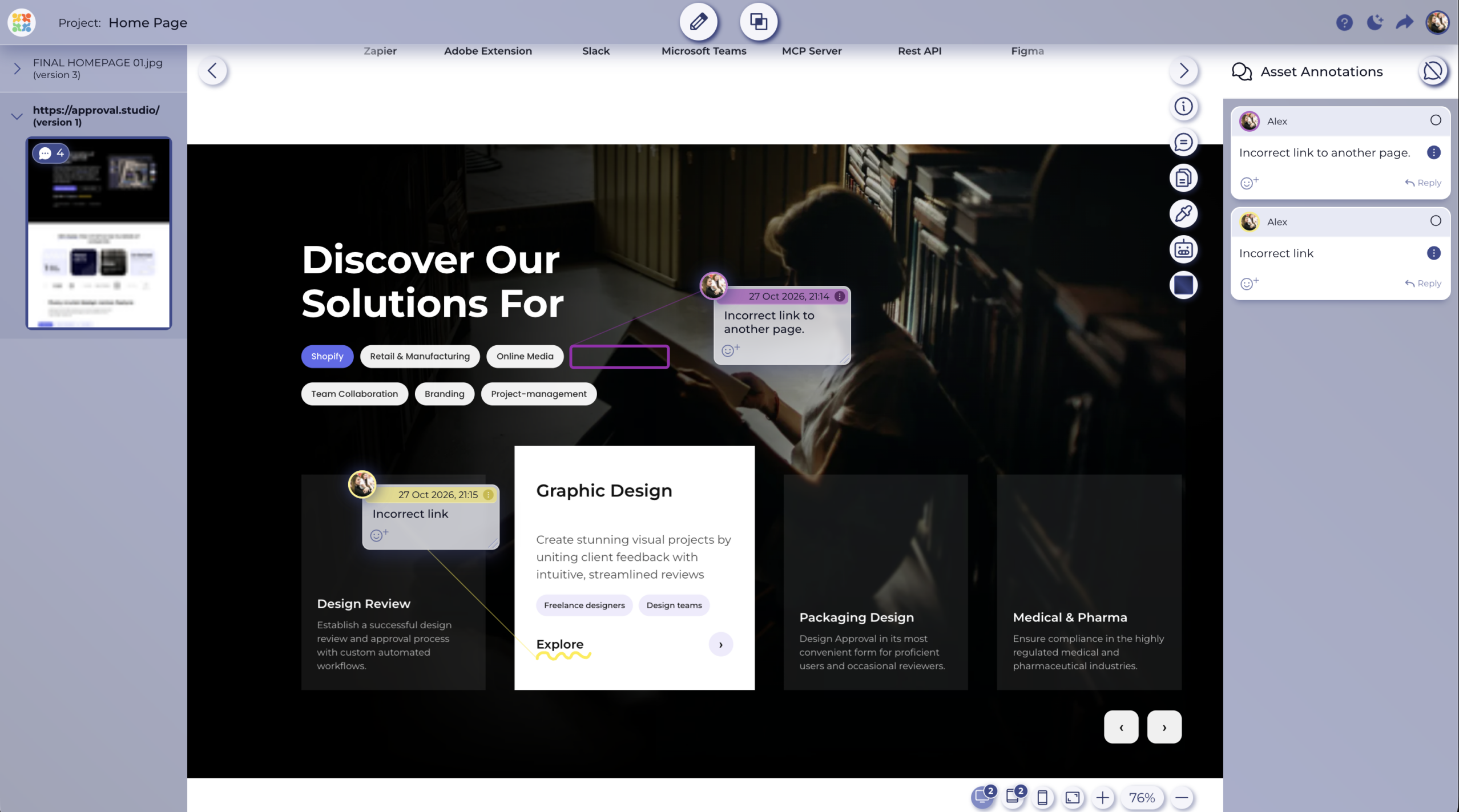
- Website proofing is in beta and included on every plan. Here’s what you get, on web pages and everything else:
- Paste a URL to review a live page
- Multiple pages per project, each added as its own asset
- Desktop, tablet and mobile views captured at the same time
- Five annotation shapes to mark up a website the same way you’d mark up a PDF or a dieline
- Clearly visible Approve/Reject buttons
- Reviewer invitations via a short link or customizable email, no account needed
- Real-time chat in the review tool, no page refresh required
- Built-in tools: color separation viewer, barcode reader, ruler, spellchecker and AI assistant (some are paid extras, depending on your plan)
- Trigger-based workflows for automated routing (paid extra, included on Enterprise)
- If you want the full walkthrough, here’s how website proofing works step by step.
Version Management
- Every version, comment, and decision stays in the platform and ties back to the approval record, whether the asset is a landing page or a brochure.
- Recapture a URL or upload a new file to start a new review cycle
- Automated file versioning
- Four comparison modes: side-by-side, side-by-side with difference, fader and toggle
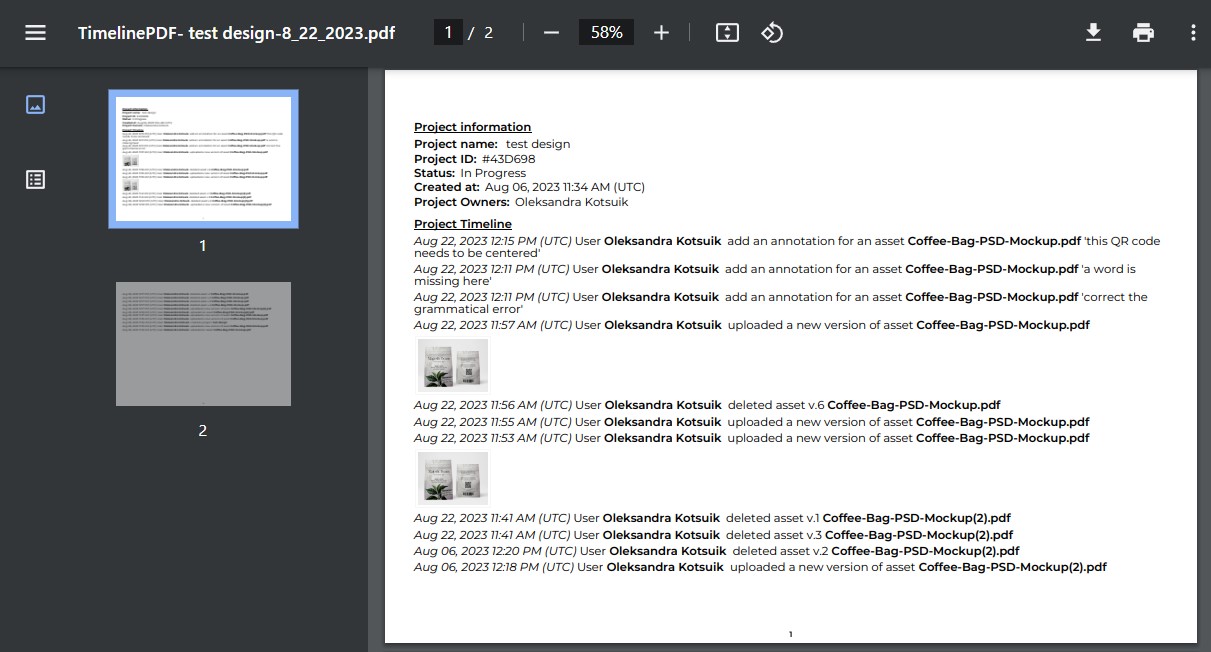
- Timeline: every action taken on a project is automatically recorded
- Proof report: a detailed record for an asset across all its versions
- Digital Asset Library (DAL): one central place to store approved assets
Integrations
Our list is built around where creative and marketing work happens. You send work from the tools your designers use, and approvals come back to the tools your managers check.
- Figma
- Canva
- Adobe Creative Cloud
- Dropbox
- Asana
- Microsoft Teams
- Slack
- Shopify integration for e-commerce creative approval workflows
- Zapier
- REST and GraphQL API
- MCP server
Who should choose BugHerd, and who needs a BugHerd alternative?
Now, you might still be wondering why the tantrum at the beginning of the article? Well, my friends, having lived through the experience of getting used to software that did not fit my standards, I’ve made it my life mission to stop as many people as I can from doing exactly that. So, here’s my breakdown of when you should choose which tool.
When BugHerd is the right option
Your website is the whole job. If you’re a web development agency or a product team, the site is the deliverable, not one asset in a campaign. There’s no brochure in the queue and no packaging waiting for legal. In that case, BugHerd’s focus is a plus, because you’re not paying for print tools you’d never open.
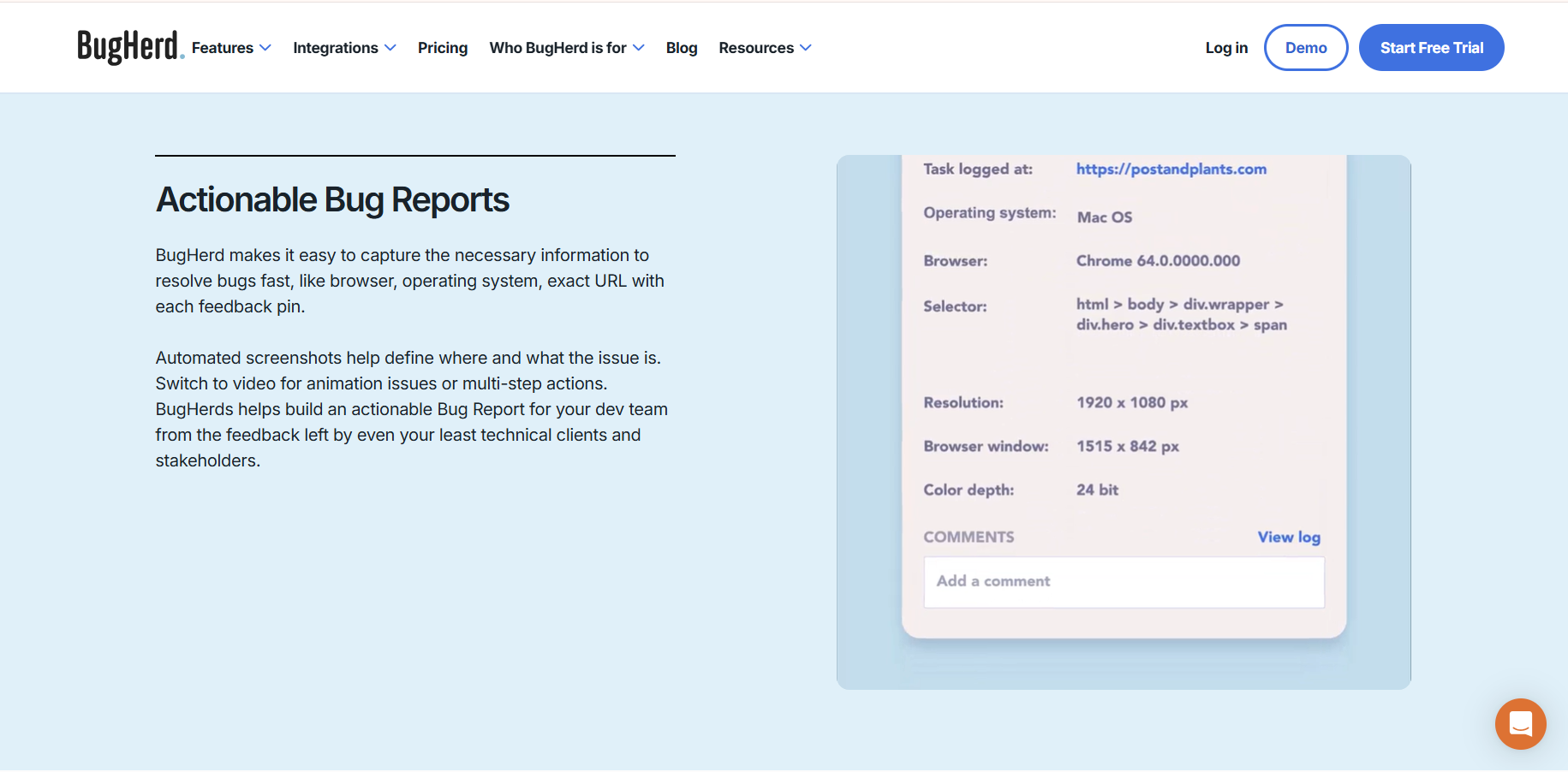
Most of your feedback is bugs. Broken layouts, buttons that do nothing, that one page that only falls apart on your client’s laptop. BugHerd captures the browser, OS, screen size and exact page element with every comment, so your developer can reproduce the issue without three rounds of “can you send a screenshot?”. We don’t capture that data, and if fixing things is your main job, you’d miss it.
Your team lives in developer tools. GitHub is on every BugHerd plan, Jira and Linear come with Premium, and BugHerd’s MCP connects to coding tools like Claude Code and Cursor. Every comment becomes a task on a Kanban board, which is exactly how developers want to receive feedback. Your CMO might hate that board, but your dev team will feel right at home.
You want to start small. BugHerd starts at $42 a month for five members on annual billing, with unlimited guests and projects on every plan. If you’re a small team that just needs clients pointing at things on a live page, that’s hard to argue with.
When Approval Studio is the better fit
Your website isn’t the only thing that needs sign-off. A typical campaign for an in-house marketing team consists of a landing page, a set of social ads, an email, a 30-second video, a printed brochure, maybe some packaging if you’re in CPG. So marketing teams don’t need a better website tool. They need one place for all of the assets, with website approval sitting next to print files, packaging design proofing, Office docs and video review.
Feedback isn’t the same as approval. This is the big one. A marketing asset goes live because the right person said yes. BugHerd doesn’t have a dedicated approval feature. Tasks just get closed. Marketing sign-off usually runs from designer to manager to legal to client, and each person needs to make a decision, not just leave a comment. In Approval Studio, every reviewer can approve or reject, and with workflow automation as an add-on, you can set up multi-step approval workflows that move the asset to the next person automatically. When it’s done, you get a proof report with every comment, decision, and timestamp.
Marketing approvers aren’t developers. Your legal team doesn’t want a Kanban board. CMO does not care what browser you were using. And a client definitely doesn’t want to learn what “Backlog → Doing → Done” means. BugHerd’s task columns are built for the person fixing the page. Marketing approvers are deciding on the page. They want to open a link, comment, and click approve. Anything more and they’ll reply to your email instead, and we’re right back where we started.
Comparing versions matters more than logging bugs. In marketing review, the most common question isn’t “what’s broken?”. It’s “what changed since last round?” Round three of a landing page review becomes a game of spot-the-difference. Did they fix the headline? Did the CTA color change? Without version comparison, your reviewers re-review the whole page every time, or worse, they don’t, and something slips through. Approval Studio’s side-by-side with difference mode shows exactly what changed.
Final thoughts
BugHerd and Approval Studio look similar from far away. Both let you click on a website and leave a comment. But they’re built around different questions. BugHerd asks “what needs fixing?”. Approval Studio asks “is this ready to go live?”.
If your website is the whole job, BugHerd answers the right question. If it’s one asset in a campaign full of brochures, banners and videos, you need marketing approval software like Approval Studio.
Try our website review tool free for 14 days, no credit card needed, and run your next landing page through the same approval flow as the rest of your campaign. And if you’d like to see more options before deciding, you can compare more website feedback tools in our full roundup.