TEAM SOLUTIONS
 WORKFLOW SOLUTIONS



 REVIEW TOOL
 PROJECT MANAGEMENT
 TOOLS & INTEGRATIONS
 CLIENT INTERVIEWS




Last updated: November 2026
A decent free plan is a rare occurrence, as it is. Most client approval software is built for agencies, with team seats, approval stages, and a price tag to match. And all you really want is for your client to look at a file, leave a few comments, and say yes. So when a tool with a free forever plan comes along, it gets a lot of attention, and rightly so.
One good example of a simple proofing app with a free forever plan is Ashore app. In this article, we’ll get into the reasons many freelancers like it. And if you’re already in the know, there’s a new player on the market that’s ready to compete for your attention.
What Is Ashore?
Founded in 2017, Ashore is an online proofing and approval app for creative teams, agencies, and freelancers. Basically speaking, you upload a file, send it to your approvers, and collect their comments and decisions in one place. Its pricing page describes the plans as built for “agencies, freelancers, and enterprise teams”, and the whole model is “go as you grow”: start free, then upgrade as your volume or team grows.
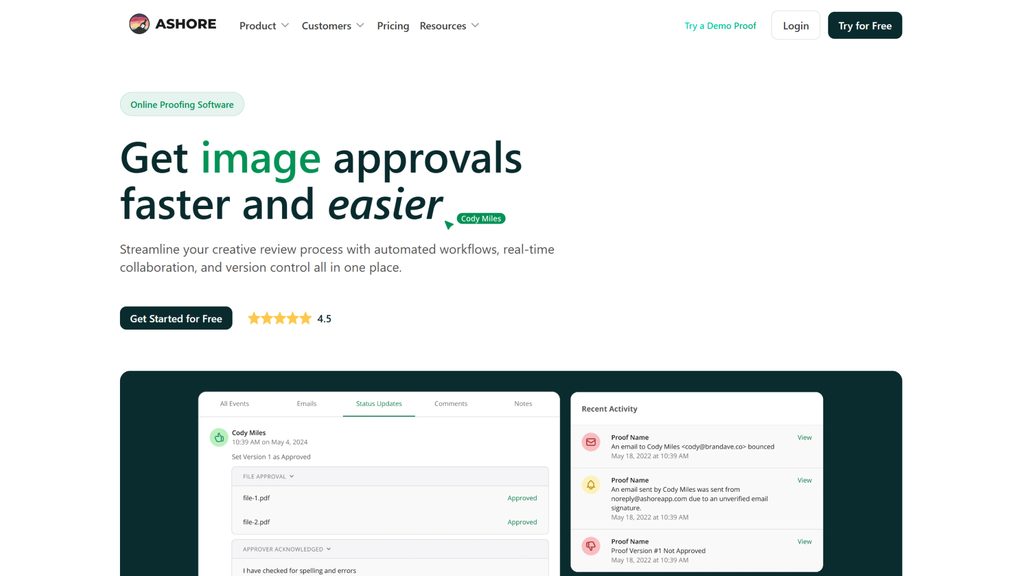
Most people come across Ashore proofing through roundups of free proofing tools, and that’s fair. Its free plan is one of the more generous ones around, and the jump to the first paid tier is small. User reviews of the Ashore app mostly describe it as simple and to the point. The flip side is that its strongest features, like automation and branding, sit on the paid plans, so it helps to know what you actually get at each level. And that’s what we’re smoothly getting into.
Ashore Features
Ashore packs a lot into a fairly small app. To keep things fair, I’ve split it into the three areas that matter most when you send work to clients: how they review it, how revisions are handled, and what happens around the review. For each one, you’ll find what’s included and get my honest take on it.
Review & Proofing
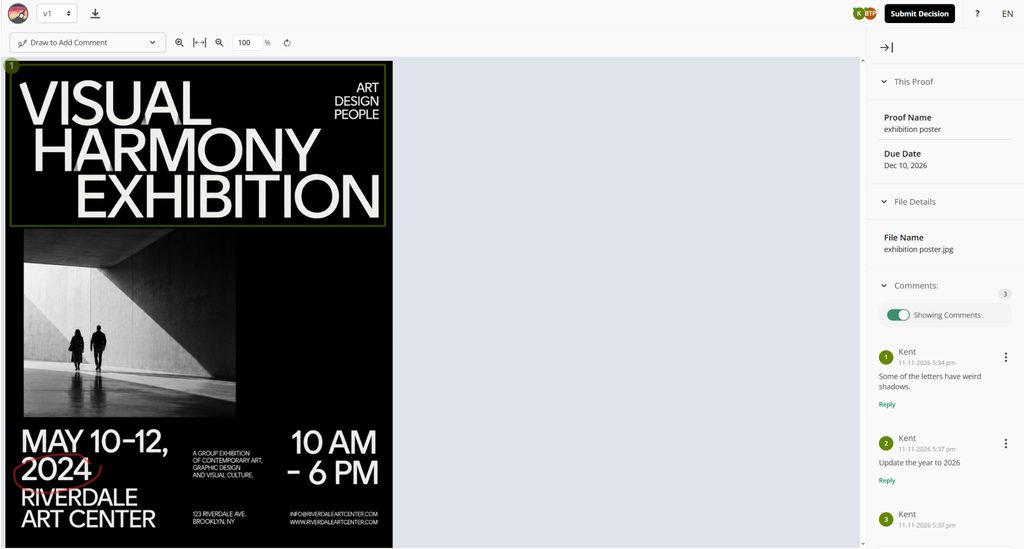
The review tool is essentially what your clients see and will judge. Ashore keeps the review screen simple: your approver opens the proof, marks what needs fixing, and leaves a decision. Where it stands out is the range of files it can handle, from a flat PNG to a video ad or a live web page.
- Four annotation tools: single click, rectangle, arrow, and freehand drawing
- Threaded comments, @mentions, resolving comments, and attaching files to comments
- Proofs for images (JPG, PNG, GIF, WEBP, BMP, TIFF, SVG), PDFs, Word documents, spreadsheets, HTML, website screenshots, and live web pages, plus MP4 and MOV video and audio files (video and audio proofing needs a paid plan)
- Files up to 2 GB each
- Approvers and comment-only reviewers; approvers never create an account, but they do enter their name and email before they start reviewing
- A review screen you can edit even on the free plan: Modern or Minimal theme, custom CSS, and your own wording for buttons like “Approved” or “Approve With Changes,” in English and Spanish
- An option to block approvers from downloading files on every paid plan, plus PDF watermarking and password-protected proofs from Standard up
Honest opinion: Ashore covers more formats than most tools at this price, and having video, audio, and website review in the same place is a real plus. The annotation set is basic, but it does the job. I’d call it “the Swiss Army knife”.
Version Management
Ashore groups each new upload with the previous ones, so you can see how a file changed from round to round. The basics come with every plan, while the smarter extras depend on how much you pay.
- Automatic version control
- Side-by-side version comparison
- Smart Review, which detects changes between versions automatically (Standard plan and up)
- An option to limit which versions approvers can see
- Proof history export
- File retention of 12 months on Starter and Standard, 24 months on Premium
Honest opinion: Side-by-side works fine for most rounds. The automatic change detection is the clever part, but it sits behind the $46-a-month plan, which is a lot for one person. Also, keep the retention limit in mind. If a client comes back two years later asking what they approved, older proofs may be gone. Verdict: memory is good, but not 10 out of 10.
Workflows & Integrations
Just like any other decent proofing tool, Ashore offers workflow automation and connects to the rest of your tools. However, it’s also where the gap between the free plan and the paid ones is the widest. Most of what’s listed below starts at Starter or higher.
- Approval workflows with stages, templates, and automatic reminders (from Starter)
- Zapier and Adobe plugins, which the plan cards list from Starter
- API access and webhooks on Premium
- Your logo on the review screen on paid plans (the Starter card calls it “limited” branding, while the FAQ places branding on Standard and up), and full white-labeling on Premium
- Job management and artwork intake forms on the higher tiers
Honest opinion: For a tool that sends out automatic reminders to your clients, Ashore is a good choice. But for a solo freelancer, most of this lives on plans you may never need. Verdict: It’s great for a print shop, a bit much for a one-person studio.
Ashore Pricing
Ashore’s free plan is generous on storage, with 1 GB and unlimited approvers, but the 30-files-a-month cap is the part to watch. New versions count toward it. When I tested the free plan, one file plus one new version took the counter from 30 to 28, and Ashore’s knowledge base adds that deleting a proof doesn’t give those files back. So a logo with four revision rounds can use up a big chunk of your month in one go.
The free plan also leaves out a few things you might expect. Video and audio proofing need a paid plan, and so do workflows, reminders, and integrations: on a free account, those settings only show an upgrade button. For a freelancer with a handful of image and PDF proofs a month, that’s fine. Once your revision rounds or file types grow, this is usually the moment people start looking at paid plans, or at an Ashore alternative.
Here’s what each plan costs and adds. Prices are per month, billed annually, with the monthly billing price in brackets:
| Plan | Price | Users | Files per month | Storage | What it adds |
|---|---|---|---|---|---|
| Free | $0, forever | 1 | 30 (new versions count) | 1 GB | Core proofing, unlimited approvers, side-by-side version comparison |
| Starter | $15 ($18) | 1 | 150 per user | Unlimited | Video and audio proofing, approval workflows and reminders, your logo on review screens, Adobe plugins, Zapier* |
| Standard | $46 ($57) | 3 | 150 per user | Unlimited | Smart Review, artwork intake forms, PDF watermarking, password-protected proofs |
| Premium | $199 ($249) | 5 | Unlimited | Unlimited | Job management, contact portal, API access, full white-labeling |
*Ashore’s plan cards list Zapier from Starter, while its pricing FAQ mentions it only on Standard and Premium, so check with them if Zapier matters to you. Extra users cost $15 to $23 per month on annual billing (up to $29 monthly), depending on the plan. Files are kept for 12 months on Starter and Standard and 24 months on Premium. Prices verified on ashoreapp.com/pricing in November 2026.
Ashore vs ExpressReview: Side-by-Side Comparison
At the beginning, I mentioned some “new player” on the market. ExpressReview, ladies and gentlemen, is what we’re going to compare to Ashore today. We’ll start with a big scary table and then move on to the ExpressReview overview.
| Feature | Ashore | ExpressReview | Winner |
|---|---|---|---|
| Free plan | 30 files per month (new versions count), 1 GB storage, no video, audio, workflows, or integrations | 1 active file, 3 versions, 100 MB storage | ✅ Ashore |
| Cheapest paid plan | $18/mo ($15/mo annually) | $9.99/mo or $99.99/year | ✅ ExpressReview |
| What the paid plan unlocks | 150 files per month, unlimited storage, automation | Unlimited files and versions, 1 GB storage | Depends on your volume |
| Reviewers | Unlimited | Unlimited | 🤝 |
| What the client fills in | Name and email, no account | Just a name, no account | ✅ ExpressReview |
| Annotation tools | 4: Point, rectangle, arrow, drawing | 5: Point, box, circle, arrow, freehand | ✅ ExpressReview |
| Revision rounds | Each round uses one of your 30 monthly files | Up to 3 versions per file; unlimited on Express plan | Depends on your work |
| Version comparison | Side by side on every plan; automatic change detection on Standard+ | 4 modes: side by side, difference, fader, toggle | ✅ ExpressReview |
| Color checks | ✗ | Eyedropper with RGB, CMYK, and Pantone values, ruler, background picker | ✅ ExpressReview |
| Selectable text | ✗ | ✓ (Beta) | ✅ ExpressReview |
| File types | Images, PDFs, Word and spreadsheet files, HTML, websites, plus video and audio on paid plans | Images (including AI and TIFF), PDFs up to 50 pages, Word, Excel, and PowerPoint files | 🤝 |
| Max file size | 2 GB | 100 MB | ✅ Ashore |
| Several files in one review | Yes; approvers can approve each file separately | One file per link | ✅ Ashore |
| Approval record for each version | ✓ | ✓ | 🤝 |
| Automatic contact management | Yes; Contacts appear upon filling up their name and email for review | ✗ | ✅ Ashore |
| Mobile apps | No app; review works in a phone browser | iOS and Android, with push notifications | ✅ ExpressReview |
| Workflows and integrations | Paid plans only (from Starter) | ✗ | ✅ Ashore |
| Room to grow | Upgrade within Ashore’s tiers | Move to Approval Studio for projects, teams, and workflows | 🤝 |
Pricing verified as of November 2026. Check ashoreapp.com/pricing and the ExpressReview plans before you decide.
ExpressReview Features
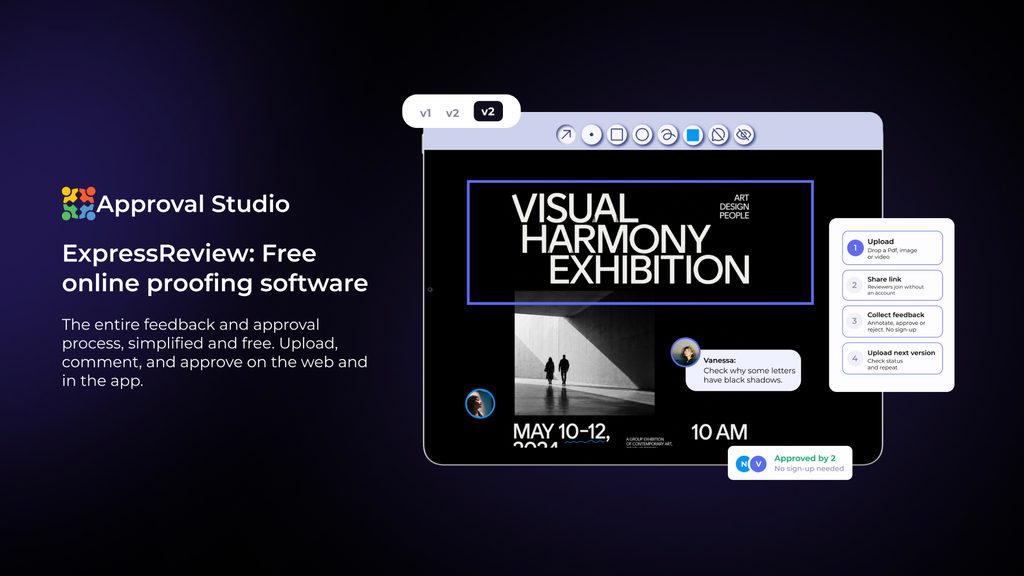
ExpressReview is a free proofing tool from Approval Studio, made for freelancers and solo marketers who need a clear sign-off from a client. It uses the same review engine as Approval Studio, minus projects, teams, and workflows. Think of it as a client feedback tool with one job: get your file from “first draft” to “approved” with as little back-and-forth as possible. Below, I’ve grouped its features into the same three areas as Ashore’s, so you can compare them side by side.
Review & Proofing
As I’ve said, ExpressReview is built around one simple loop. And there’s no sign-up form or app to install on the client’s side, which is often what gets a slow one to finally reply. The review tools are the same ones larger Approval Studio teams use, with a few extras that come in handy for print and brand work.
- Upload a file, share one link, and your client reviews it in any browser on desktop, tablet, or phone, with no account and nothing to install
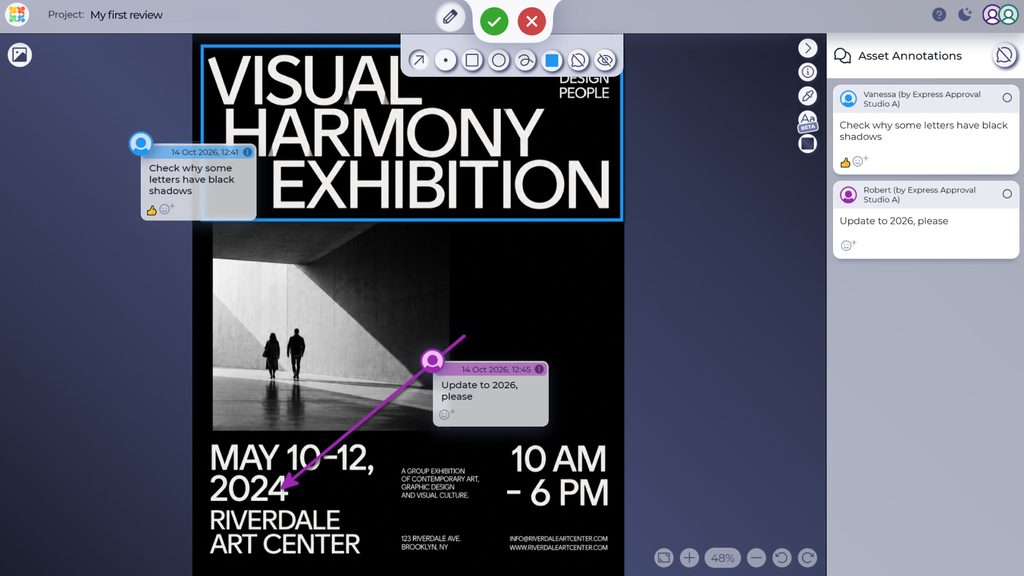
- 5 annotation tools (point, box, circle, arrow, and freehand) with threaded comments
- A discussion panel that collects every comment in one list
- An eyedropper that shows RGB, CMYK, and Pantone values, and a background picker
- Selectable text (beta): the tool runs OCR on the file, so you can search the text, select words, and highlight misspellings before your client spots them
- Images (TIFF, JPEG, GIF, BMP, PNG, AI) and documents (PDF, DOCX, XLS, XLSX, PPT, PPTX, RTF, TXT, ODT, ODS), up to 100 MB per file and 50 pages per PDF
Version Management
Every client project has rounds, and ExpressReview keeps each one in its own place. The new version sits right next to the old one, along with everything that was said about it. That makes it easy to check your changes before the client does.
- Revisions upload as new versions of the same file, so the history stays connected
- 4 compare modes: side by side, difference, fader, and toggle
- Each version keeps its own comments and its own decision, with a name and a date
- Each version gets a new link, so clients never comment on an old file by mistake
Workflows & Integrations
This is where the two tools differ the most. ExpressReview keeps it simple. It has no workflows and no classic integrations, so you won’t find approval stages, automatic reminders, or a Zapier connection here. What it has instead is a review link that works anywhere your clients already are, and for one file and one client, that link does most of the job an integration would.
- A short review link with a copy button, ready to paste into email, Slack, WhatsApp, Telegram, Discord, etc.
- A new link for every version, so your client always lands on the latest round
- Links your client can forward to a colleague; everyone types their name, so each comment stays tied to the right person
- iOS and Android apps with push notifications the moment someone comments or makes a decision
- The interface in six languages: English, Ukrainian, Polish, French, German, and Spanish
If you later need workflows or connections to Adobe, Shopify, Zapier, or Slack, you’ll find those in Approval Studio, which runs on the same review tool. More on that, though, in “When You Outgrow Both” below.
Which One Should You Pick?
Honestly speaking, both are good proof approval software for small teams, and as client approval software for a solo freelancer, neither is a bad choice. We’ve already gone through the features, so instead of repeating them, here are a few typical situations. If you recognize yourself in one of them, you probably have your answer.
When Ashore Is the Better Fit
You run a small studio or print shop, and files come in all week. You send dozens of proofs a month to different clients, and you don’t want to think about storage at all. At $15 a month, Ashore’s Starter plan gives you 150 uploads and unlimited space, which is hard to beat at that volume.
Your work doesn’t stop at static designs. One week it’s a brochure, the next it’s a 30-second video ad, an audio, or a landing page. If you’d rather have all of it reviewed in one place, one of Ashore’s paid plans is that “Swiss army knife” you seek.
You spend too much time chasing approvals. Clients forget to reply, a second person needs to see the file only after the first one says yes, and you’re the one sending reminder emails every other day. Ashore’s paid workflows send those reminders and move proofs between stages for you, which takes a good part of that routing off your plate for not much money.
You need integrations on a small budget. You work in Adobe apps all day and want approved files to land in your other tools. Ashore’s $15 Starter plan lists Adobe plugins and Zapier (check whether Zapier needs Standard, as their pricing page says both).
Your clients should see your brand. If you sell design work under your studio’s name, having your logo on the review screen and in every email makes the whole process feel more professional.
When ExpressReview Is the Better Fit
You’re a solo designer with a couple of active projects at a time. You send a logo, a poster, or a packaging mock-up, wait for a clear yes, and move on to the next one. You don’t need stages or dashboards, just a decision on each file.
Your clients are the “I’m not signing up for anything” type. Say, you work with a busy cafe owner who opens your link on their phone between orders. They type their name, tap on the menu price that’s wrong, and approve the rest, all in a couple of minutes.
A small mistake means a reprint. You design flyers, labels, or packaging, where a slightly wrong Pantone or a typo in a phone number costs real money. Checking color values and scanning the copy for typos before the client ever sees the file is part of your routine.
Your sign-offs aren’t only design files. Half the things you need approved are pitch decks in PowerPoint or website copy in Word. ExpressReview opens those in the same viewer as your images and PDFs, so you don’t need a separate tool for documents.
Your projects go through a lot of rounds on a few files. If your problem is rather revisions than volume, I’d recommend ExpressReview. Four compare modes help you show exactly what changed, and when three versions on the free plan aren’t enough, you can remove the limits for $9.99 a month.
When You Outgrow Both
Both tools are made for small setups, so it’s worth knowing what the next step looks like before you commit to either. The signs that you’ve outgrown a solo tool are usually build up slowly and then all at once:
- You bring in a second designer or a subcontractor, and you both need to work on the same files.
- A client wants three people to sign off in a set order, and you end up forwarding links and tracking who said yes in a spreadsheet.
- You’re running enough projects at once that a simple list of files stops making sense.
- You keep moving approved files into other tools by hand: an online store, a print order, a project board.
- You spend more time chasing replies than making the actual changes.
Growing with Ashore
Ashore’s growth path is built around volume and automation. The Standard plan ($46 a month, billed annually) gives you three users, Smart Review, PDF watermarks, password-protected proofs, and artwork intake forms where clients submit their files and briefs themselves. Premium ($199 a month) is aimed at production teams, with job management on a kanban board, a contact portal where clients see every proof you’ve sent them, API access, and full white-labeling. It’s a natural next step if you’re turning into a small print or production shop.
Growing with ExpressReview
ExpressReview’s next step is Approval Studio, which runs on the same review tool. The Lite plan ($60 a month, billed annually) adds projects, room for five users, and 5 GB of storage, so a small team can work on the same files. Pro ($160 a month) is where the automation comes in: multi-stage approval workflows, tasks, analytics, and integrations with Adobe Creative Cloud, Shopify, Zapier, and Slack, plus an API and an MCP server for AI tools. It’s a natural next step if you’re growing into a design or packaging studio with several reviewers on every file.
So while you’re choosing between the two today, take a minute to look at where each path leads. A setup that works perfectly for one person can get expensive or awkward once there are three of you, and it’s easier to plan for that now than to switch tools in the middle of a busy month.
Final Thoughts
Ashore is a good tool, and I’d happily recommend it to anyone who proofs lots of formats or wants their approvals to run on autopilot. But a lot of freelance work is simpler than that. It’s one file, one client, and one clear yes, ideally without a counter ticking down in the corner.
If that sounds like your week, try ExpressReview’s free plan on your next project and see how your client reacts. It takes a few minutes to set up, and your client only needs to click a link. If you want a quick walkthrough first, here’s how to run your first client review in five steps.
Good luck!