
 TEAM SOLUTIONS
 WORKFLOW SOLUTIONS



 REVIEW TOOL
 PROJECT MANAGEMENT
 TOOLS & INTEGRATIONS
 CLIENT INTERVIEWS




Post is also avalible in:


Spring, summer, autumn, winter — it does not really matter. A new Approval Studio release is always a small holiday for us.
Why? Because every release means we get to bring you something new. New features, new improvements, smarter workflows, better tools, and, of course, a few fixes here and there. You know, the usual magic behind making Approval Studio more powerful, flexible, and fun to use.
And this time, we have a lot to share.
This release brings improvements to asset management, reference documents, workflow automation, MCP, AI-powered reporting, and even a brand-new compliance analysis tool. Some of these updates are simple and practical. Some are quite powerful. Some are powered by AI. But all of them have one thing in common: they were inspired by real users and real workflows.
So let’s take a look at what’s new.
🗂️Asset Categories
Let’s start with something that may look simple at first glance: Asset Categories.
You can now create your own asset categories and assign them to files during or after upload.
Simple? Yes.
Useful? Absolutely.
Revolutionary? Well… give us a second.
Because the real power of Asset Categories starts when you connect them with Workflow Automation.
And yes, we did exactly that.
Now, you can have multiple documents inside one project and route them separately through your workflow. Each file can follow its own approval path, independently from the others.
Let’s say you are working on a new packaging design. In real life, that process is rarely just one file. You may need to approve logos, text, artwork, technical documents, and finally the complete packaging design that combines everything together.
Previously, all those files were part of the same project, but building a separate approval logic for each type of asset was not as flexible as we wanted it to be.
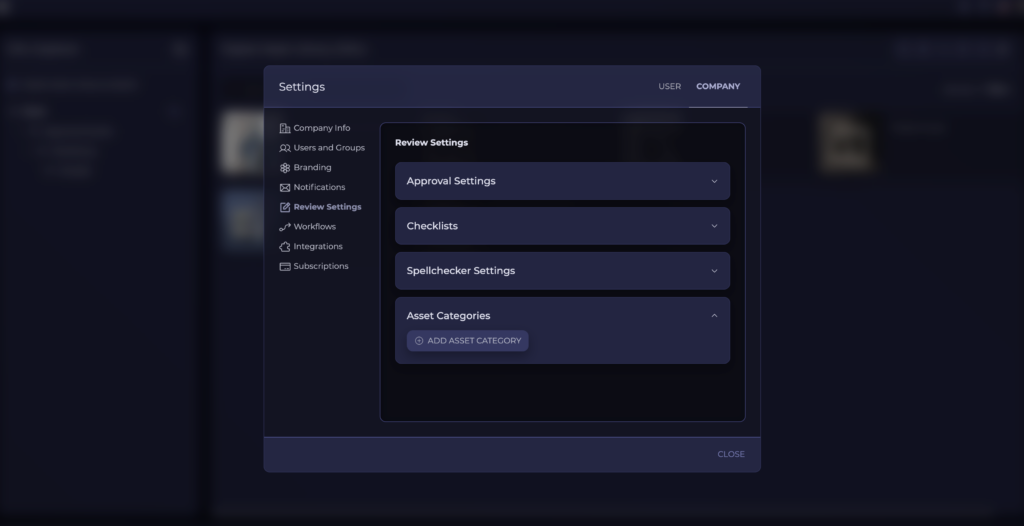
Now, with Asset Categories, you can create much more accurate workflows.
Logos can go to the brand team.
Text can go to marketing or legal.
Artwork can go to designers or production specialists.
The final packaging file can move forward only when everything else is ready.
That’s exactly the kind of workflow flexibility we want you to have.
This may sound like a small feature at first, but for complex approval processes, it can make a huge difference. You get more control, cleaner routing, and a workflow that finally behaves more like your real-life process.
📋Reference Documents Inside the Review Tool
Another improvement in this release is related to Reference Documents.
Previously, you could attach reference documents to a task, but if a reviewer wanted to see what was inside, they had to download the file and open it separately on their computer.
Did it work? Sure.
Was it perfect? Not really.
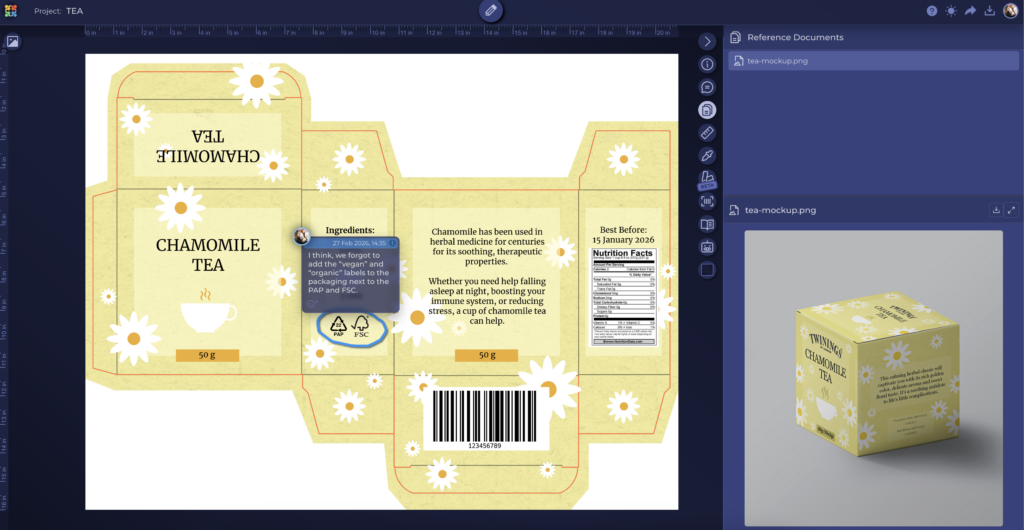
From now on, when you send a file for review, you can attach reference documents directly to the reviewed asset. The reviewer will then be able to open those documents inside the Review Tool, right next to the asset they are reviewing.
No extra downloads.
No switching between windows.
No searching for the file somewhere in the Downloads folder five minutes later.
Everything can now stay in one place.
This is especially useful when your reviewers need to follow requirements, guidelines, technical notes, brand books, product descriptions, legal instructions, or any other supporting materials during the review.
For example, if you are reviewing a packaging design, you can open the requirements document in the same review window and check the asset against those guidelines while leaving comments.
A simple change? Maybe.
A very useful one? Definitely.
And there is one more thing: Approval Studio now supports MS Office documents, which means the supported format range is wider than ever.
Reference Documents just became much more practical, and we are very excited for you to try them in your daily review process.
🤖MCP Keeps Growing
And yes — we are continuing to build and improve Approval Studio MCP.
If you remember our previous release, we introduced MCP as a new way to connect Approval Studio with AI tools and interact with your project data in a completely different way.
And honestly, it became more popular than we expected.
With MCP, users can generate individual analytics reports, automate their processes, retrieve project data, connect Approval Studio with other tools, and adjust their infrastructure to their own needs much faster than before.
The most exciting part? We have already seen users do things with MCP that even we did not expect.
That is always a good sign.
It means the feature is not just useful by itself. It becomes a foundation for users to build their own solutions, reports, automations, and AI-assisted workflows.
So, naturally, we are not stopping there.
We continue updating Approval Studio MCP, adding more supported commands, expanding its functionality, and making it more powerful for teams that want to bring AI into their approval process.
MCP is available for Approval Studio PRO and higher plan users, and you can connect it to your own Claude or ChatGPT account.
✅AI-Based Compliance Reports
Now let’s talk about one of the biggest new features in this release: AI-Based Compliance Reports, or ABC Reports.
And yes, we are very excited about this one.
ABC Reports allow you to upload a reference document with requirements and run an AI-powered analysis of the reviewed asset. The AI reads your requirements, checks the asset content against them, and generates a detailed report that helps you understand how well the asset aligns with the provided guidelines.
Of course, AI cannot replace human review.
And honestly, it should not.
But it can help you check whether something important might have been missed. It can point out possible issues, highlight areas that may require attention, and give your team an additional layer of confidence before the asset moves forward.
Think of it as a smart compliance assistant.
It does not make the final decision for you.
It does not replace your team’s expertise.
It does not magically solve every review problem.
But it helps you review faster, stay more focused, and reduce the risk of overlooking important requirements.
For teams working with packaging, labels, regulated materials, brand guidelines, technical requirements, or detailed client instructions, this can become a very powerful addition to the approval process.
ABC Reports are available as an extra feature for Approval Studio PRO and higher plan users.
If you want to test it, contact our support team, and we will help you get started.
This is one of the areas we plan to focus on in future updates, so your feedback will be especially valuable. We want to keep improving this feature, expanding its possibilities, and making AI-assisted compliance checking even more useful for real approval workflows.
📈AI Reporter Tool
Speaking of AI-based reports, we have also launched a simple but powerful AI Reporter Tool.
The idea is pretty straightforward: you get a quick overview of your team’s performance within seconds.
The AI Reporter can help you understand what is happening in your Approval Studio workspace. It can show how many projects you have, what stages they are currently in, how many review rounds you have on average, which designers delivered more assets, which projects required more revisions, and much more.
In other words, it gives you a quick look at your process without forcing you to dig through projects manually.
At the moment, the AI Reporter supports a limited number of report types, but this is just the beginning.
The reports are being built around real client needs, so if you have an idea for a report that would help your team, let us know. Contact our support team, describe what you want to see, and we will check what can be done.
You may be surprised by what our little reporter tool can already do. It’s already available for every PRO and higher plan user.
💬Built With Your Feedback
As always, we want to say a huge thank you to everyone who keeps in touch with us.
Thank you for sharing your ideas.
Thank you for reporting issues.
Thank you for suggesting improvements.
Thank you for showing us how Approval Studio is used in real-life workflows.
Every release reminds us that the best product ideas often come from users who work with the system every day. Asset Categories, Reference Documents improvements, MCP updates, AI reports — all of these features are connected to real needs, real requests, and real approval processes.
And guess what?
We are already working on the next release.
More improvements are coming. More requested features are in progress. More tools are being discussed, tested, and prepared.
So if you have an idea that could make Approval Studio better, do not be a stranger.
Reach out to our support team, tell us what you need, and who knows? Your idea might become part of the next release.
Stay creative,
The Approval Studio Team 🎉
