
 TEAM SOLUTIONS
 WORKFLOW SOLUTIONS



 REVIEW TOOL
 PROJECT MANAGEMENT
 TOOLS & INTEGRATIONS
 CLIENT INTERVIEWS




Summer is heating up, and we’re making it even hotter with the latest release of Approval Studio!
We’re excited to announce that the June 2026 version is now live, bringing a collection of new features, major usability improvements, and performance enhancements based directly on your feedback.
Let’s dive in.
🎯 Redesigned Selective Approval Mode
One of the biggest improvements in this release is a complete redesign of Selective Approval Mode.
We introduced this feature last year, and many of you loved the idea behind it. However, we also heard that the interface wasn’t always intuitive, especially for external reviewers.
We listened.
Selective Approval Mode has been completely redesigned to provide a much smoother and more user-friendly experience.
For those who haven’t used it yet, this mode allows you to send multiple assets for review in a single session. Reviewers can approve the files they like while rejecting the ones that need changes—all without opening each file individually.
But that’s not all.
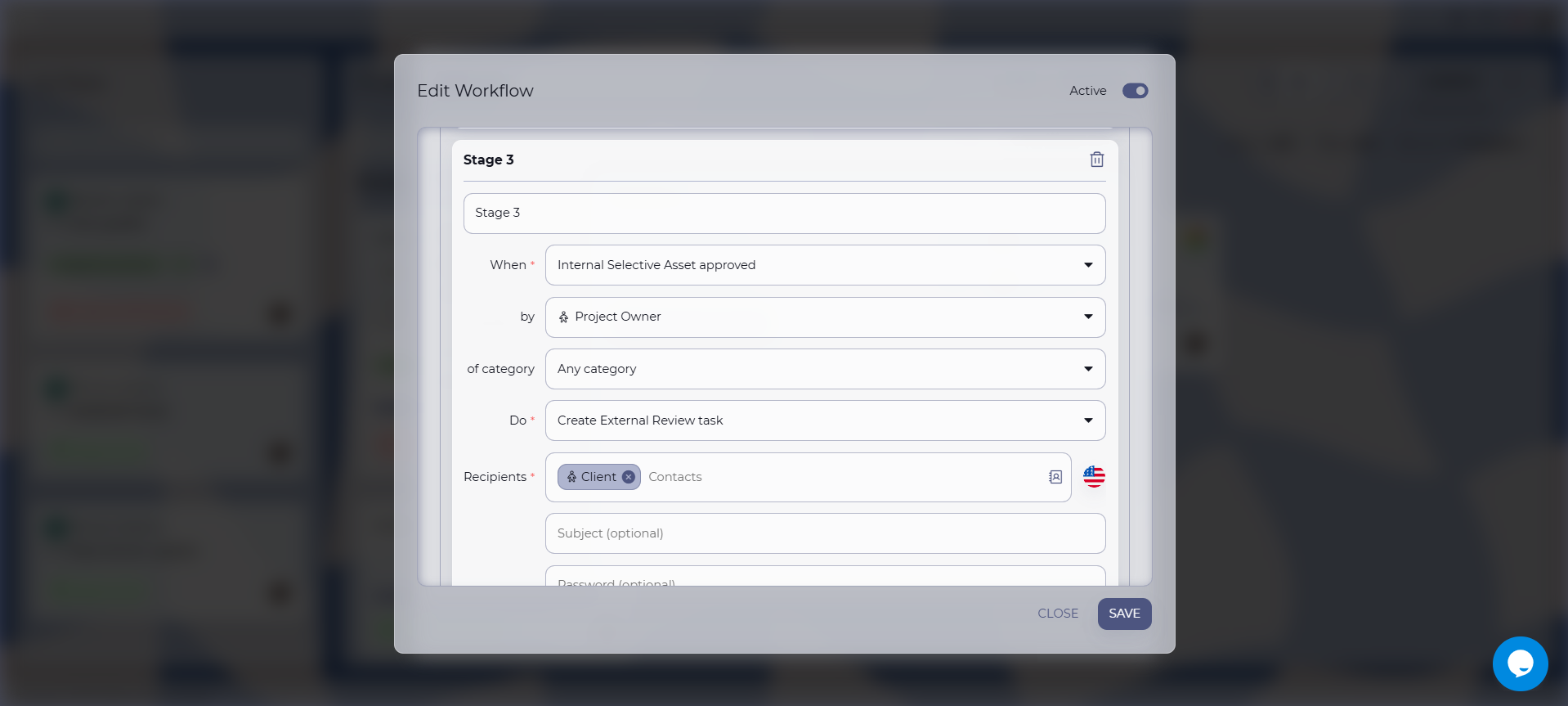
Selective Approval Mode is now fully integrated with Workflow Automation.
This means you can build automated approval workflows around batch approvals, making it much easier to review product variations, packaging options, marketing materials, or any collection of related assets.
We believe this will become one of the most useful workflow enhancements we’ve released this year, and as always, we can’t wait to hear what you think.
🎨 Color Separation Gets Faster (and Smarter)
Another feature receiving a major upgrade is Color Separation.
Although it was introduced only a few months ago, it quickly became one of our most popular tools. Along the way, many of you shared valuable feedback about performance and usability.
So we went back to work.
The new Color Separation engine is significantly faster and more responsive than before. We’ve optimized the processing pipeline and introduced several improvements that make working with complex artwork much smoother.
Highlights include:
- Faster processing of large and complex files.
- Improved overall responsiveness.
- Ink Density — instantly check the total ink coverage of your artwork to help identify potential printing issues before production.
- Channel Grouping — group related color channels together for a cleaner and more organized view.
- Channel Visibility Controls — easily turn individual color channels on or off, allowing you to isolate specific separations and inspect artwork in much greater detail.
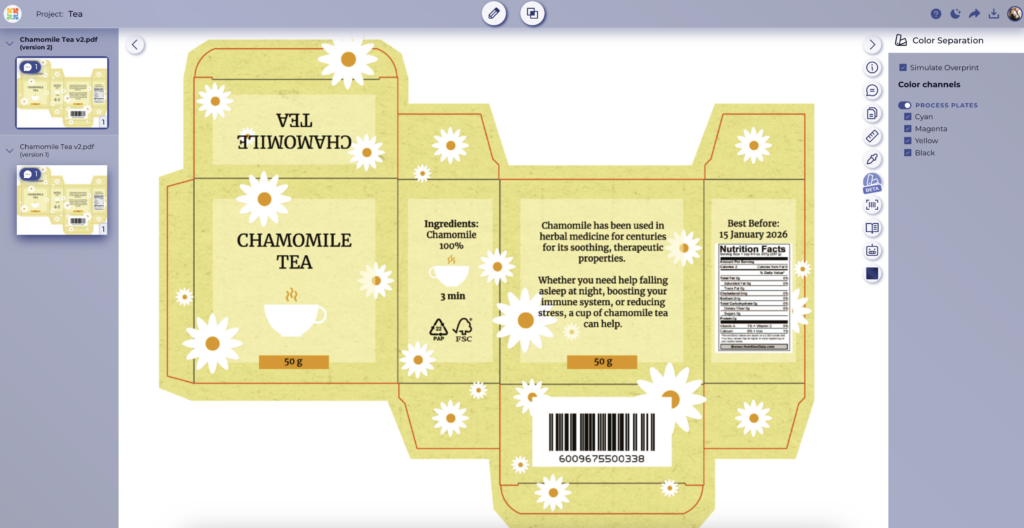
The feature is still officially in Beta, but it’s already a significant improvement over the previous version. Whether you’re checking separations, verifying ink coverage, or inspecting individual printing plates, the new Color Separation tool makes the process much faster and more convenient.
⚙️ Workflow Automation Becomes Even More Powerful
We’ve also continued improving Workflow Automation, introducing new workflow steps and enhancements that make automating your approval process even more flexible.
As mentioned earlier, we’ve added dedicated workflow steps for Selective Approval Mode. These new steps react to the approval or rejection of an individual file rather than waiting for the entire review task to be completed.
Imagine you send ten files for review in a single task. As soon as the first file is approved, it can immediately continue to the next workflow step—or return to the designer if it’s rejected—while the remaining nine files continue their review. No more waiting for every asset to be processed before automation can continue.
Another major enhancement is the introduction of File Categories across all workflow steps responsible for asset routing.
Think of a file category as a unique identifier for each asset inside your workflow.
For example, a file categorized as Brochure can continue through one approval path, while another file categorized as Packaging Artwork can follow a completely different route. If the packaging artwork is rejected, it can automatically return to the designer, while the brochure continues to production—all within the same project.
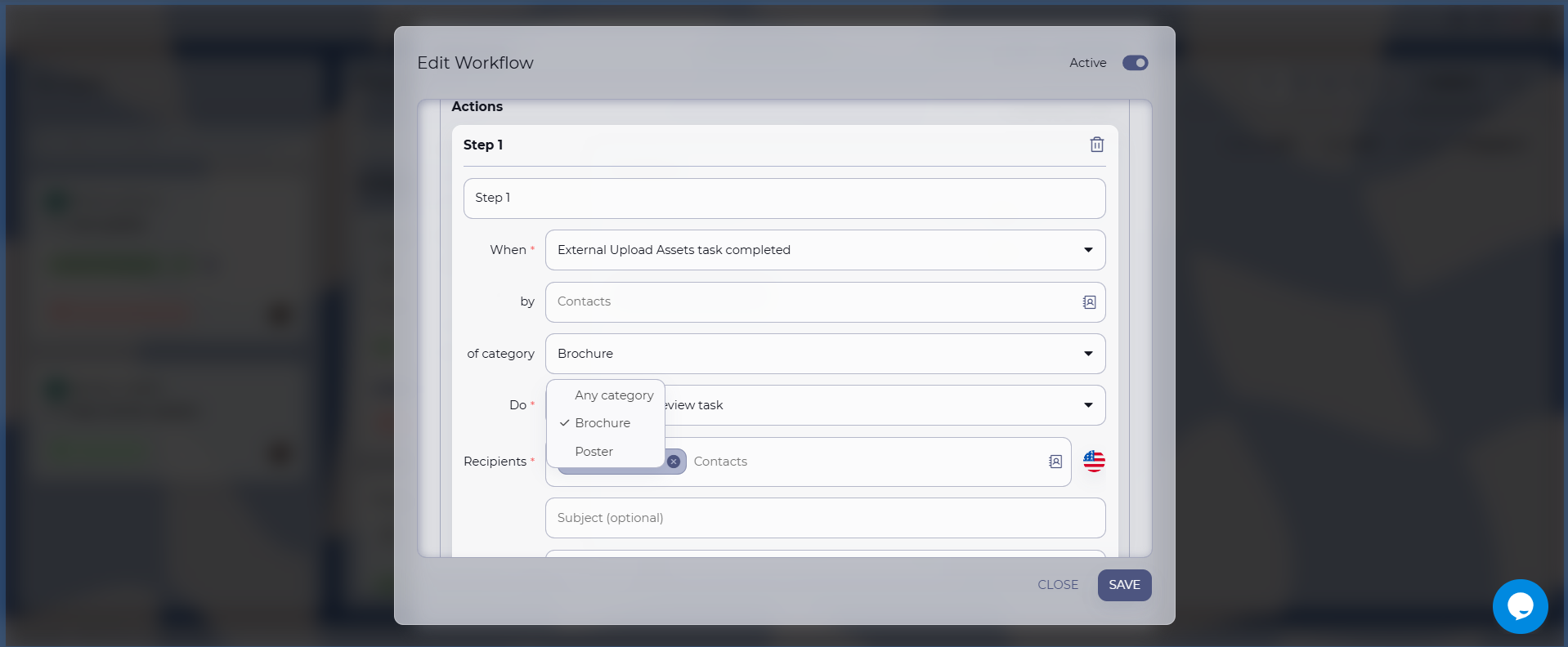
This gives you complete flexibility to build truly intelligent workflows where every asset follows its own approval journey.
Be sure to explore the new workflow steps and conditions—they’ll allow you to simplify even the most complex approval processes.
🛠️ Review Tool Improvements
As always, we’ve included numerous bug fixes and quality-of-life improvements requested by you.
One area that received special attention is the Review Tool.
Based on your feedback, we’ve improved several inspection tools, including:
- Color Picker
- Barcode Scanner
- Ruler & Measurement Tool
The values displayed by these tools are now fully selectable and can be copied directly into your documentation, emails, or quality reports. Previously, these values were read-only, but now it’s as simple as Copy & Paste.
We’ve also expanded the information displayed by these tools, making them even more useful during artwork inspections.
❤️ Thank You
Finally, we’d like to thank everyone who continues to help make Approval Studio better.
Every feature request, every bug report, every suggestion, and every piece of feedback helps shape the direction of the platform. We genuinely appreciate everyone who takes the time to tell us what works well—and what could work even better.
Please don’t be a stranger.
If you have ideas for new functionality, notice an issue, or simply want to tell us how you’re using Approval Studio, we’d love to hear from you. Our support team is always happy to help.
And one last thing…
We’re already working on another major feature—something many of you have been requesting for a long time. It’s already in testing and is scheduled to be released later this summer.
We’re not going to spoil the surprise just yet… but we think you’re going to love it.
Thank you for being part of the Approval Studio community, and we’ll see you in the next release!
Stay creative,
The Approval Studio Team🎉
