
 TEAM SOLUTIONS
 WORKFLOW SOLUTIONS



 REVIEW TOOL
 PROJECT MANAGEMENT
 TOOLS & INTEGRATIONS
 CLIENT INTERVIEWS




Post is also avalible in:


Last updated: June 2026
All change is hard. But some change is necessary for survival. People learned it during the Industrial Revolution first, and are going through it now with the transition to online proofing. For someone whose job is inherently tied to discussing ideas, improving on them, and receiving feedback, online proofing is revolutionary.
And there are hundreds of tools that are supporting this shift. These real-time design review tools replace email-based feedback with a shared online environment where reviewers annotate directly on the file. Every comment, version, and approval decision is recorded in one place, visible to all stakeholders at once, without downloading attachments or managing email threads.
But why should we forget our old ways and embrace new ones? Let’s discuss the benefits of online proofing and whether you should switch as well.
What it used to be like: traditional proofing
Do you remember that scene in The Devil Wears Prada in which the main character, Andrea, brings the final version of the Book to her literal house? It was so difficult: waiting for all the middle managers to approve (in the same way, I fear) their parts, then applying all the small changes, approving again, printing, driving across the city, and only then approving. And all that for Miranda to give another thousand corrections.
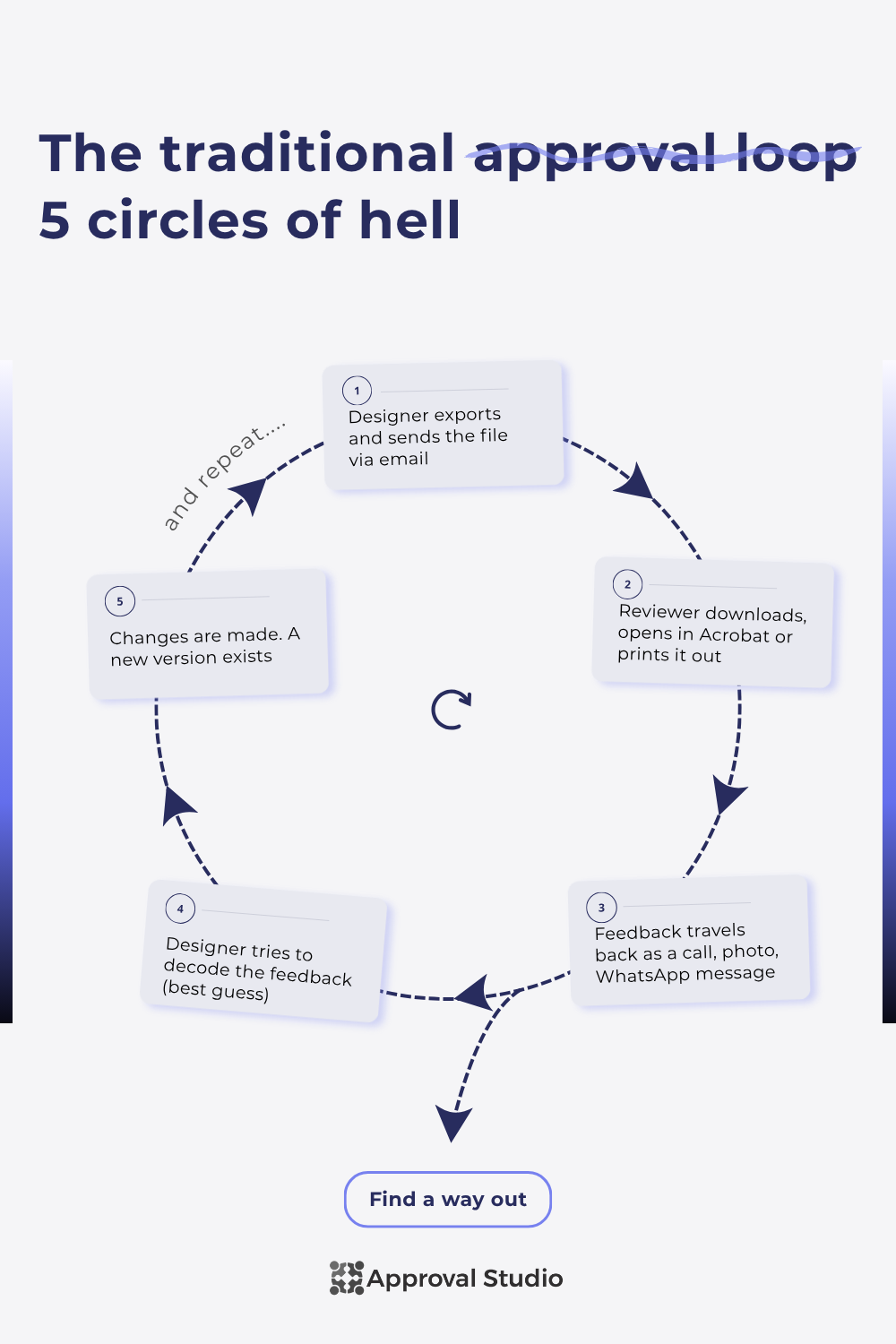
That’s what traditional proofing basically is. A constant circle of the same 5 steps:
- A designer exports a file and sends it via email
- The reviewer downloads it and opens it in Acrobat or prints it and writes feedback on a piece of paper
- This feedback then somehow finds its way to a designer (a call, a piece of paper, or a WhatsApp message)
- The designer interprets (read: guesses) the intent and makes changes
- The cycle begins anew
It is questionable how effective it is.
77%
of creatives had to stretch a deadline at least once because artwork wasn’t approved by all parties on time.
Approval Studio Questionnaire— link↗
And no, that doesn’t only mean that people don’t do their job well. It is a clear tell that something in a workflow wasn’t done correctly. So, people have started looking for a new way.
The new way: online proofing
Online proofing is the industrial revolution in the world of every design-facing industry. And even though design feedback tools (such as Approval Studio) had existed since 2017, the real rise occurred in 2020 during COVID. The pandemic and the remote job heaven (and especially the realization that it was going to last) made many teams think about whether there’s a better way to do things around here. And there was.
Online proofing eliminated the most annoying parts of traditional proofing (like downloading the file by the reviewer, feedback in emails, calls, and screenshots, etc.). And then added a few extra features for industry-specific approvals (like barcode scanning or live website proofing), some project management tools, and storage options.
Now, online proofing is a big topic on its own. If you want a full picture, we’ve covered it in a separate article. So, feel free to check it out first, and then come back here for more advanced knowledge.

Advantages of Real-Time Design Review Tools
Now that we know what traditional and online proofing are, let’s discuss whether you really need to switch and what you will get from such a change in creative approval workflow. These advantages are backed up by my personal observations about a workflow that switches from traditional to online proofing.
Easier to communicate
Online proofing software replace vague descriptions with annotations pinned directly to the relevant part of the design. Listen, I get confused by feedback easily. There, I said it. I have no clue what “that purple button” or “right here” means. However, I often give feedback in the same way. You see, my mind is like Sherlock Holmes’, I make a million connections a second, and in my head, everything makes sense. However, on the outside, it looks something like “The left page link is wrong, changed it last month, new design”. Imagine getting such a message out of context.

Well, an online proofing tool helps deal with that. You get comments pinned to a specific part of the design, the ability to attach references to those comments, replies, and an overall feeling of being more organized, thus a better thinking process and communication. I even color-code mine, with each corresponding to an objective mistake, subjective matter of taste, or an outright error. The correct online proofing tool disciplines you and your feedback methods.
Faster response times
A dedicated review environment reduces the time from file-share to decision by removing the friction of downloading, switching tools, and manually tracking who still needs to respond. This one has two sides: discipline and time. Let’s start with a more abstract one while we are on the topic of vibes.
Have you noticed how much easier it is to work if you do that at a clean, pretty desktop, using a cool laptop, and listening to motivational music? Well, an online proofing tool accomplishes that in the approval process. Would you be happier to proof a design with color-coding, emojis, and in an interactive tool, or by writing everything in a white email sheet using sans serif and with Acrobat on the other half of the screen?

Okay, I get it, you might say, but not everyone works using “vibes”. Of course, they don’t. They might be a very hard-working person, opening a few reference documents in different tabs, and a design in the fifth, then writing all the notes by hand, checking everything again (5 open tabs, may I remind you), looking through the entire company asset library for some references, and then retyping that in an email. Or they can do that inside a review tool. I know what I’ll choose.
Oh, and a cherry on top, for those forgetful reviewers, is that online proofing software usually has a system in place to remind them about unfinished reviews automatically. So, one less annoying task on your to-do.
Less version-to-version failure
Online proofing tools maintain a full version history automatically, always surface the latest file by default, and can be configured to show reviewers only the current version. Two truths, one lie: you’re reading this article, I wrote this article, neither of us has ever confused the final and pre-final versions. It’s okay, you can admit it. However, it’s an awful experience that I never want to repeat, please.

So what to do? Use an online proofing tool, of course! When a project has ten or more versions, and most changes are purely cosmetic, it really is almost impossible to distinguish between them. However, in a review tool, the latest version is often the one at the top, and if you’re quickly sending it for a review, the system will send the latest one automatically. And what’s best (for me), you can just delete all the versions from the computer as soon as you upload them, and then just download the truly final version off the review tool, because it does not botch the quality.
Less software variety
A complete online proofing tool consolidates feedback, file storage, stakeholder communication, and approval records into a single workspace, reducing the number of applications a team needs to switch between at every stage of a review cycle. I wanted to be a multiple software person, I truly did. You know, a few to-dos for different purposes, one tool for feedback, one for storing every asset, one for communicating with a designer, one for the manager, etc. But I’m not. All I use is Google Docs and Approval Studio.
1100
is the number of times that employees switch between critical work apps per day.
Source: Pega, 2018— link↗
When most of your work is concentrated in one software, not only is it easier to store and manage everything, but it’s also good for your concentration. A reel can and will be opened while you’re switching from one tab to another, but a good online proofing tool will provide it all: feedback & approval, asset management and storage, and even communication with designers and stakeholders. In that way, you minimize your tool stack to less than 5, and your attention span and wallet are forever indebted to you.
Clearer approval record
Every action inside an online proofing tool is logged with a timestamp: who opened the file, who commented, who approved, and on which version, creating an auditable record that a reply-all email thread cannot replicate. The most important thing in a job where you approve stuff is not being right, but being able to prove something. A/B testing showed that you were right from the beginning? A mistake slipped through to the customer, and you flagged it? Someone else approved the asset, it never reached your table, but you’re somehow responsible? A clear record is a must.
An online proofing tool gives you that clear approval and feedback record. In a good tool, you would be able to see everything: who opened, who was assigned, who commented what and when, who approved and with which comments, who sent that to the client, etc.

Of course, I went into a more petty way; however, it’s not just about being right. Across most professional environments, an approval record isn’t optional. It protects the unsuspecting, innocent parties from falsely attributed errors during faulty mass prints, legal disputes, and awkward meetings with angry stakeholders.
Traditional proofing vs. online proofing at a glance
All that is great, however, let’s sum up a little. Here’s a side-by-side comparison of what traditional proofing is and which online proofing features enhance it.
When traditional proofing still makes sense
But if you’ve read it and feel a slight dread because it does sound effective, but there’s no way you can fit it in your workflow, let me tell you something. While online proofing is an amazing invention, there are still cases when you have to either partially or completely rely on traditional proofing.
Case 1: It only makes sense to transition partially. If your process includes hard proofs, I’m sorry to disappoint you, but you won’t be able to replace it with online proofing. Soft proofs, sure, especially with the software that allows for color proofing, have rulers to double-check the bleed and crop marks. However, hard proofs must be physical only due to their main purpose being to actually feel the design in a physical world.
Case 2: You really should, but you cannot legally. For pharma, some packaging industries, and others, the sign-off should be done under specific, validated systems. Even some of the best online proofing tools, unfortunately, do not support that. And in that case, the sign-off process should be done with two different systems: an approval one and a regulatory sign-off one.
Case 3: You can, but it makes little sense. You have a single designer a desk away, with no external stakeholders or internal partners that have to sign off. You receive two emails a week asking what you think, and that’s it. Surely, you can spend money on a review tool because it does make it easier to markup. However, you will add file uploads, extra cost, time to learn a new tool – all to solve a problem you didn’t have. You’re better off thinking about it when at least one other person enters review&approval process.
Final thoughts
In any case, I really do hope that you don’t fall under any of these categories, because an online proofing tool is an amazing thing! As something of a perfectionist myself, working in marketing, I honestly have no clue how I would’ve functioned without it. Even this article is soon to go through an approval hell, which will be made a little easier with Approval Studio. I’ll just upload a brief, article infographics and visuals, and article text in one project and wait for a green light. Or a red light, but at least I’ll know exactly what to fix.
Feel free to try it for yourself! We have already compiled a list of online proofing software for your convenience, in case you want to change your ways.
And good luck with any design projects.
