
 TEAM SOLUTIONS
 WORKFLOW SOLUTIONS



 REVIEW TOOL
 PROJECT MANAGEMENT
 TOOLS & INTEGRATIONS
 CLIENT INTERVIEWS




🎁 A Fresh New Look, Your Own Domain, and Much More: Approval Studio’s November Release Is Here!
Hello again! The days are getting shorter, but our release notes are not. 😄
In October, I ended our release notes with a small hint: many of you asked to open Approval Studio under your own company’s domain, and I said we were working on it. Well, it’s here. And it brought company: a completely new look for the Review Tool, report packages you can buy yourself, a faster viewer and a long list of improvements you asked for.
Let’s start with the one you’ll notice first.
🎨 Meet the New Review Tool
The Review Tool is where you spend most of your time in Approval Studio, so we gave it a complete makeover.
The new design is cleaner, calmer, and easier to find your way around:
- A clear top bar. Your logo and project name on the left, the people currently in the review session, and all the tools in one row.
- View, Annotate and Compare are now three simple modes in one switch, with the right toolbar appearing next to them.
- Decisions where you expect them. Request Changes, Approve with Changes and Approve sit together in the top bar, so reviewers never have to look for them.
- Light or dark, whichever you prefer, with one click.
- Made for every screen. On a tablet or a phone, the Review Tool now adapts: a compact top bar, an action bar at the bottom, and your files and tools in easy-to-reach panels. Your clients can approve a proof from their phone without pinching and zooming.
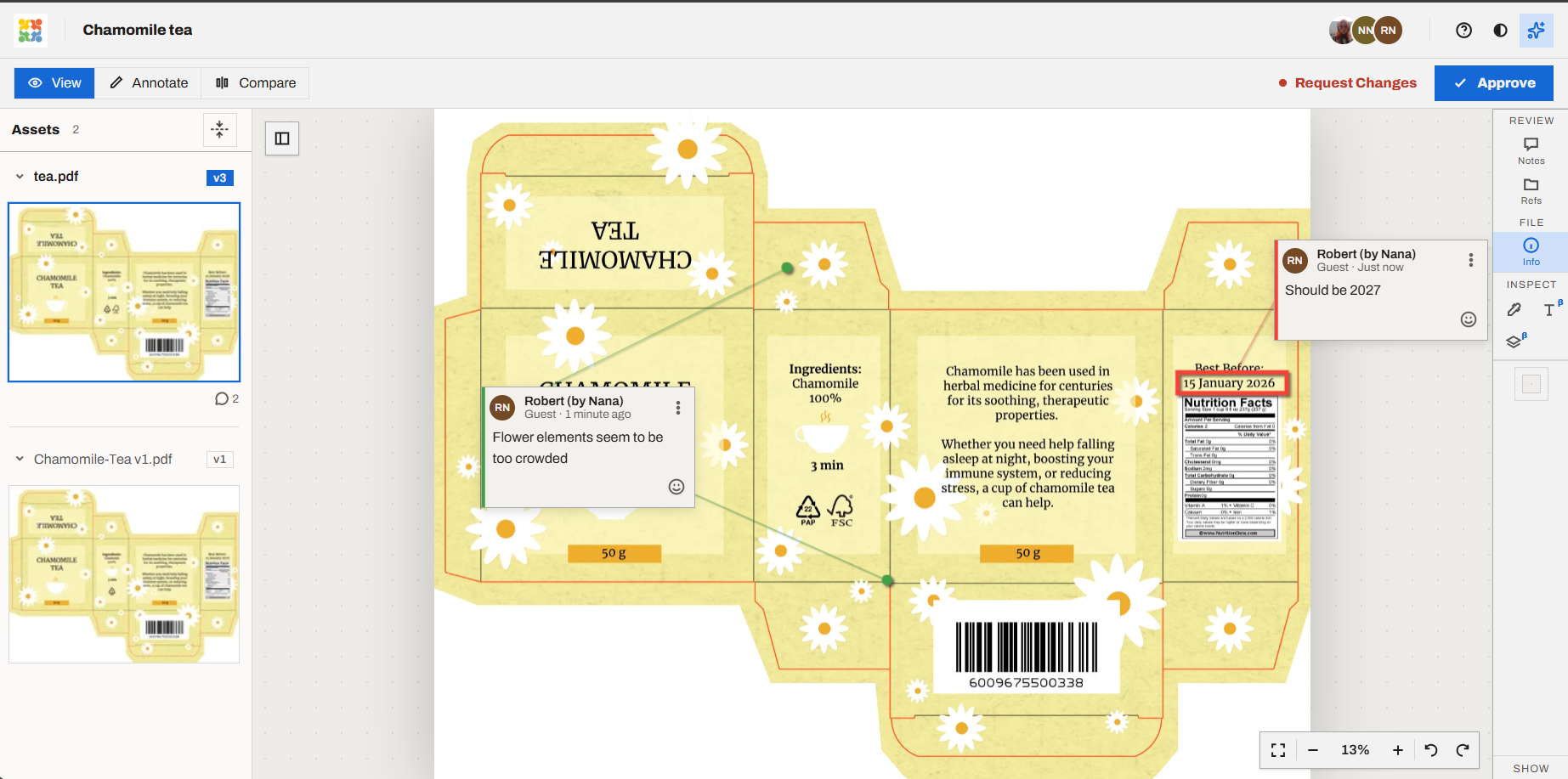
Not ready to switch yet? No problem. Use the design button in the top bar to move between the new design and the Classic one at any time. We’d love to hear what you think, so please tell us what works for you and what you’d change.

🌐 Your Own Domain Is Here
Here’s the promise from our October release notes, kept.
You can now open Approval Studio under your own company’s domain, for example, review.yourcompany.com. Your team, your reviewers and your clients see your address, not ours. Review invitations, notifications, and short links all lead to your domain, and signing in (including Sign in with Google) keeps you there.
Setting it up is simple:
- Go to Settings → Company Management → Branding and request your custom domain.
- Our support team will contact you and help with the small DNS change on your side.
- As soon as everything is ready, Approval Studio opens on your domain.
The custom domain is available as an add-on for PRO plans and higher. Want it for your company? Just reach out to our support team.
📊 Buy FDA and ABC Report Packages Yourself
FDA Design Validation and AI-Based Compliance (ABC) reports have quickly become favourites among our packaging customers. Until now, you had to ask our team to set up your report limits. Not anymore.
Company administrators on PRO and PRO XL plans can now add report packages directly in Settings → Subscriptions:
- 100 FDA reports per month and 100 ABC reports per month, as add-ons to your subscription.
- On a yearly plan, you still get 100 reports every month, with two months free.
- Ran out before the end of the month? Buy 100 extra reports for the current month in a couple of clicks, with no change to your subscription.
- Ready to go at once. Buying a package switches the feature on for your company automatically.
You can always see how many reports you’ve used this month on the Subscriptions page.
[Screenshot: FDA and ABC report usage on the Subscriptions page]
👥 Default Project Owners
Do the same people need to own every project in your company, like an account manager or a studio lead? Now you can add them automatically.
Go to Settings → Company Management → Review Settings and open the new Default project owners panel. Choose the people, save, and they’ll be added as owners to every new project, together with whoever creates it. Projects created in a folder with its own preset owners get those as well, with nobody listed twice.
🔔 Every Reminder Now Appears in the Timeline
When a client says “nobody reminded us”, you can now check. Every review and upload reminder that Approval Studio sends to an external user appears in the project Timeline, with the recipient and the date and time. The entries are also included in the Timeline export and the proof report, and they’re available through the API.
We’ve also improved the Timeline itself: it loads faster, lists the files an external reviewer opened as a clear list, and keeps task names in place.
⚡ A Faster, Sharper Review Tool
We know how important it is for proofs to open quickly and look crisp. This release includes a lot of work under the hood:
- Lighter page images. Pages are now delivered in a more efficient image format, so they load faster, especially on large, multi-page files.
- A newer viewer engine for smoother zooming and panning.
- A better PDF renderer for everyone. All companies now use our higher-quality PDF renderer, which handles complex and layered files better.
If you’ve seen slow or blurry proofs before, please give it another try and let us know how it feels.
🔗 Quick Links You Can Trust
Thanks to detailed reports from our customers, we’ve made Quick Links more reliable. If a short link can’t be created for any reason, you now see a clear message, and nothing is copied to your clipboard. No more risk of pasting an old link by mistake.
🔒 Security Improvements
Keeping your artwork and your clients’ data safe is our top priority. This release includes a broad set of security improvements across the web application, the Review Tool and file access. There’s nothing you need to do: you’re already protected.
🛠️ Plus the Usual Improvements…
As always, this release also includes plenty of smaller improvements and fixes:
- Project owner emails: the “You were assigned as project owner” notification is now on by default, and owners preset on a folder receive it too.
- New Asset Version Upload: the upload page now links to the review session, so the external designer can see the requested changes. The workflow step for this task now supports asset categories.
- Website review: deleting the latest version of a website no longer removes earlier versions, and Lite companies can now approve websites.
- Quick links respect your download restrictions.
- Closed tasks no longer accept new annotations.
- Digital Asset Library: several fixes for files opened in the Review Tool from the library.
- Shopify: an updated version of our Shopify app.
- Fixes for user invitations, Sign in with Google, the Stripe customer portal button and many more.
🤫 What’s Next?
You know the tradition: here’s your hint. The Review Tool got its new look this month. Guess which part of Approval Studio is next? 😉
❤️ Thank You
A huge thank you to everyone who sent us ideas, bug reports and honest feedback this autumn. Many of this release’s improvements, from Quick Links to the reminders in the Timeline, started with a message from one of you.
So please, keep them coming. Tell us what you’d like to improve, simplify or automate. Your idea might become part of the next release. 💡
Stay creative, The Approval Studio Team 🎉
