Last updated: June 2026
The packaging design industry must be one of those that are easier just to let go and go with the flow than to study. The sheer number of people, teams, and processes involved in a single chapstick box (and I’m not even mentioning the chapstick itself) can scare people away from the industry.
But it shouldn’t scare you, my friend. I will help you understand it, and as a little sweet treat, we will discuss some tools to help you make it make sense.
Packaging design workflow in short
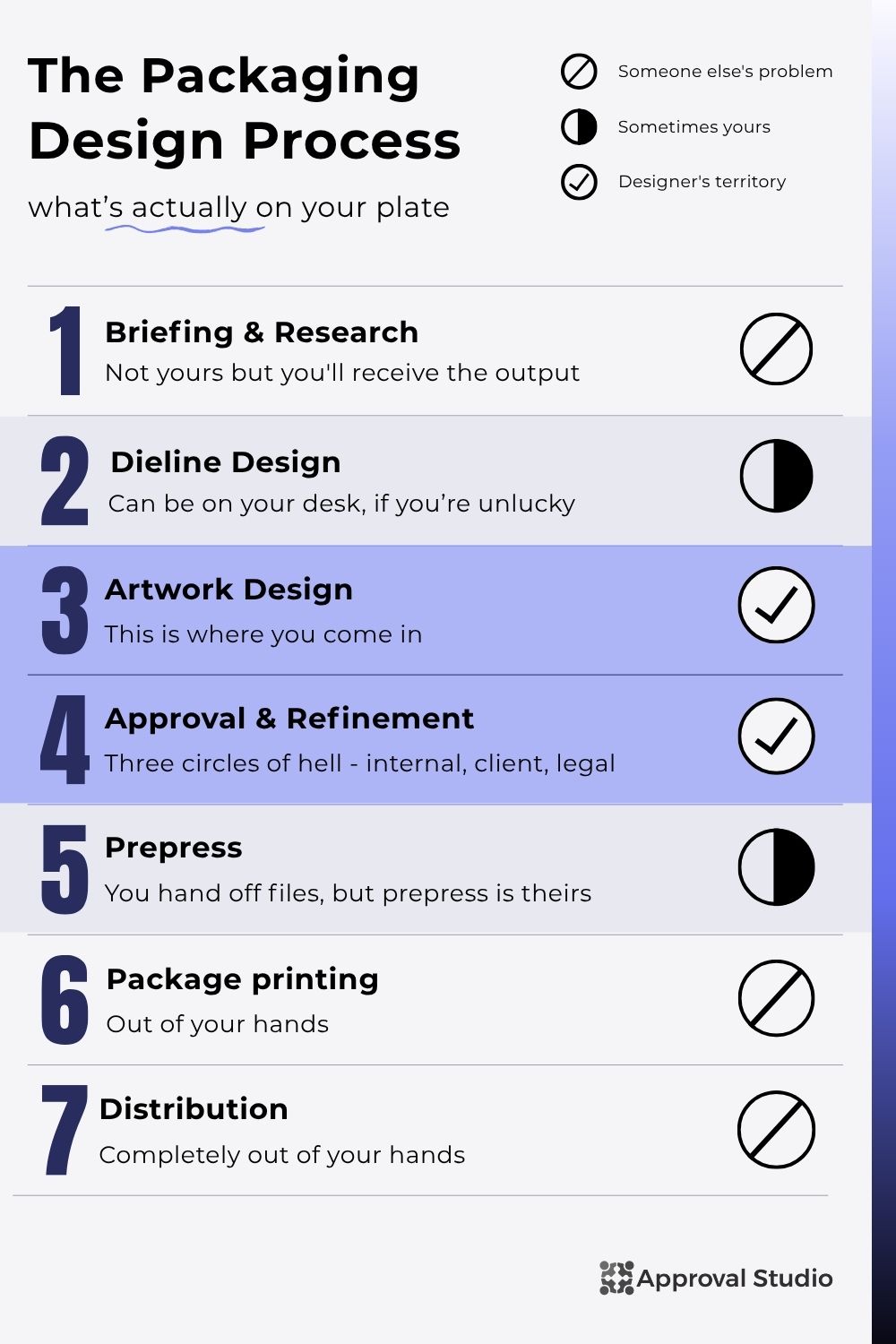
We’ve discussed all of these processes in our How Packaging Design Works article, if you want to go into more detail. However, today we are going to quickly go over more designer-facing parts. For the designer, the real work starts in the Artwork design part, where all the briefing and (sometimes) dieline designs are given to you with a message, “Make something pretty!”
After the design is ready, you start the endless process of approval and refinement. The design usually goes through the first circle of hell (internal approval), after which you create a visualization and enter the second circle of hell (client approval), to then get into the last and worst one (legal approval). After all that, the design is quickly prepared for prepress and goes into the free swimming out of the designer’s reach (like the latter stages of prepress, printing, and distribution).
Packaging design software types
But we are talking about packaging design tools today, so let’s split up the stages slightly differently by the end goal of each (it will make sense in the end, I promise). Look at the list above, which three intermediate goals do you think there are? Take a moment to think.
The moment passed too fast because I know you looked. The goals are: create structural design, create graphics/artwork, and review&approve everything. Sure, these three are not done in order; however, they best represent how the designer’s work is organized. And additionally, that’s the best way to organize your packaging design software.
Again, for a successful packaging design workflow, you need these packaging design tools:
- Specialized structural design software for creating dieline designs, 3d mockups, and preparing the artwork for prepress.
- Packaging artwork software for creating a design itself, but it has to be industry-acknowledged with correct formats and specifics like layers, colors, etc.
- Packaging proofing software that supports the format you work with and allows for on-screen feedback, commenting, version management, and approval control.
Oh, but how about we use one tool for it all? You might think that that will be cheaper, and more focused because you won’t need to remember many passwords and have one single workspace. Unfortunately, you are wrong. The teams that do try to pack it all into one software end up sacrificing the quality of at least one process, and in packaging, that usually means the approval one.
45%
of all US food recalls in 2024 were caused by label errors, costing the food industry an estimated $1.92 billion in direct recall expenses.
Source: New Food Magazine, 2025— link↗
So, sure, you can try using a CAD tool for approval, but then it won’t be a question of quality, but of how long you and your wallet can take it.
Now that we’re all done with theory (does it feel like a video essay yet?), let’s jump into different packaging design software.
Software for structural design
This part will only apply to some designers. As we’ve already talked about, dieline designs are usually made before the job even reaches the designer’s table. However, not everyone is that lucky, and it’s always nice to show them that you’re better. So here are the tools that you can use for structural design:
ImpactCAD
It is the challenger and one of the most popular enterprise solutions on the market. It provides parametric, 3D visualizations, strong on-point-of-sale displays, and complex folding structures. However, with it being an enterprise solution comes a big problem (maybe even bigger than high pricing). It doesn’t have a specific price, and you have to approach their team to get a custom price point based on which features you need. A total vibe killer for me, but having done some research, I’ve found that the prices can start between $200-300 per month. But honestly, fool around and find out!

Pacdora
This one is my favourite because of their website, really check it out, even if you are not going to use their services. But, back to business. Pacdora is a service that gives you dieline templates, generates mockups, and does 3D visualizations, all in a fun GenZ style. This app is more accessible for agencies and freelancers as it can be free (but with watermarks on all templates), and the lowest tier starts at €16/seat/month

Blender
This one is tricky because you can only use it for 3D visualizations (unlike all other tools). However, it is also a black sheep because it is completely free. The only thing you will need to pay for is mockups, and only if you are too lazy to make them by yourself or find a free one on the internet. The good thing about Blender is that you can set the visualization in the exact way you want it to be to make the best impression, even though that will cost you some time.

Adobe Illustrator
An industry classic is in the house. Adobe Illustrator does it all: creates dieline designs, mockups, and prepress preparation. And that’s only the stuff that concerns structural design. To not repeat myself later, it is also one of the most prominent packaging artwork design tools, and people will look down on you if you don’t provide the design in .ai format. If you’re designing packaging professionally and not using it, there’s a very specific reason why, and you already know what it is. Illustrator’s pricing starts at $22.99 per month

Software for artwork & graphics
You’ve already met the main character. Adobe Illustrator is your primary packaging artwork tool, and we’ve already covered it above. But here’s the thing: Illustrator does the artwork, and occasionally you need something that either replaces it, supplements it, or makes what comes out of it look extraordinary. So here’s what else belongs in your toolkit:
CorelDRAW
The most serious Illustrator alternative out there, and one with a genuinely long history in the printing and packaging industry, particularly in Europe, where you’ll find entire studios that never touched Illustrator in their life. CorelDRAW handles vector artwork at the same professional level, has built-in packaging templates that Illustrator doesn’t bother with, and integrates well with prepress workflows. If your clients or suppliers are in the CorelDRAW ecosystem, working in it will save you more headaches than switching them will. Subscription pricing starts at around $32/month, roughly the same as Illustrator, with a one-time perpetual license option around $773 if you’re allergic to subscriptions on principle (respect).

Adobe Substance 3D
This one is Illustrator’s visually impressive sibling that most packaging designers sleep on. Once your artwork is done, Substance 3D lets you wrap it around a photorealistic 3D model of the package with accurate lighting, material surfaces, and environment rendering. The result is the kind of mockup that makes a client forget they’re looking at a file and start asking when it ships. It’s particularly useful for pitching new packaging concepts or producing e-commerce hero images before anything goes to print. Substance 3D is available for around $59.99/month if you only need that one tool.

Canva
I’ll be honest with you: Canva is in this list because leaving it out would be dishonest, not because I’m excited about it. For small brands and early-stage startups designing simple retail packaging without a dedicated designer on the team, Canva gets something made. The templates are decent, the learning curve is nearly flat, and the free tier is genuinely usable.
The problem is the ceiling, because it’s almost impossible to control color profiles, there’s no proper dieline workflow, and export formats make prepress operators age visibly. You can use it pretty successfully for early concept exploration and presentations, but please, for the love of god, do not use it to send files to print unless you enjoy hurting people. Free plan is available; Pro starts at $15/month.

Software for review & approval
And here we are, the section that has the opportunity to save your sanity and confirm that you’ve been doing it wrong this whole time. The design is done, it looks great, and everyone is excited. Now it needs to get approved by five people from different generations, with polar opposite opinions. Oh, and you have to use email. That’s an indie horror film, I’d be too scared to watch.
Dedicated review and approval software exists to stop that process. The category allows for annotations directly on the file, version control that actually works, role-based approval stages, and a full audit trail of who said what and when. Here’s what’s worth your time:
PageProof
PageProof is built specifically for review and approval, with a strong focus on packaging and print workflows — annotation, versioning, multi-stage approvals, the works. Two things set it apart for packaging specifically: reviewers don’t need an account to leave feedback (which sounds minor until you’re chasing sign-off from a client’s legal department at 5 pm), and it has a built-in barcode reader, which is a must-have for any packaging artwork process.
The catch is the price: it starts at $249/month, which is premium territory and more than some teams expect for something they aren’t even sure they need. However, you’re not paying for simplicity here; you’re paying for a tool that was designed specifically for the kind of files and the kind of stakeholders you’re dealing with.

Ziflow
Ziflow is where you go when the approval workflow has genuinely enterprise-level complexity. Imagine multiple departments, multi-country legal review, deep integration with DAM systems, and project management platforms that large organizations usually use. The workflow customization is serious, the routing logic handles things that would break simpler tools, and the integrations list is long. The tradeoff is that it’s priced and structured accordingly. If your team has five approval stakeholders, you probably don’t need it. If you have fifty, you might. Ziflow does have a free plan for the curious, but anything useful starts at $199/month.

GoProof
GoProof takes a different angle entirely: it lives inside Adobe Creative Cloud as a plugin, which means designers send proofs without leaving Illustrator or InDesign. For teams that live in Adobe and want fewer context switches in their day, that’s a genuinely useful difference. The proofing itself is solid (annotations, versions, approvals), just delivered from inside the tool you’re already in. Pricing starts around $129/month.

Approval Studio
Okay, so. What if you want the clean workflow of PageProof, the multi-stage approval logic of Ziflow, the designer-friendly experience of GoProof, barcode verification, version comparison, audit trails, packaging-specific file support, and you don’t want to pay enterprise pricing for it or sit through a sales call to find out what it costs? That’s basically Approval Studio.

It covers the full packaging artwork management cycle with review and approval workflows. It’s built with packaging files in mind, and the pricing is flat, not per seat, not custom, just $60, $160, or $300 a month, depending on your team size and feature list. For most packaging studios and brand teams, it’s the one tool on this list you can actually just sign up for and start using today.
How to choose the software for your team
The honest answer is: you need three tools, one from each category above (or Illustrator package to boil it down to two). Anyone telling you otherwise is either selling you something or is really optimistic about what CAD software can do with PDF annotations.
So, for your convenience, I identified a few team types you are probably a part of and which software you should use:
Solo designer / small brand: Pacdora for 3D mockups and dieline design → Illustrator or Canva for artwork → Approval Studio for client review. It’s affordable and will cover every single aspect from idea to shelf.
Mid-size creative agency: Illustrator + Substance 3D for artwork → Approval Studio or GoProof for review. Structural design is usually handled by the print supplier, but if it’s not, Illustrator’s functionality would be more than enough for a one-time use.
Large CPG brand: ImpactCAD (supplier-side) → Illustrator for artwork → Approval Studio or Ziflow, depending on whether you have five approval stakeholders or fifty.
Print supplier offering client-facing proofing: Pacdora→ Illustrator→ Approval Studio to handle the client review loop cleanly, regardless of what design software the client used upstream.
So, basically, you create a pattern where each handoff point (structural → artwork → review) feels clean and like it was meant to be there. Surely, the list above is not comprehensive enough to cover all those little aspects that come up. Maybe you are a contractor who is required to do a 3D render for each project of yours. Then, your process might look like Illustrator→ Blender→ Approval Studio. Unfortunately, you will have to think for yourself just a tiny little bit to make those brain creases work.
Packaging design software at a glance
Before we say our goodbyes, I’ve made a little overview of all the packaging design software we talked about with you today:
Final thoughts
Packaging design software should be considered in a workflow to be actually useful and not waste anyone’s money. The tools that help you build a box, the tools that help you make it beautiful, and the tools that help you get everyone to agree it’s ready to print are three genuinely different types of software solving three genuinely different problems.
Sure, I also want to have everything in one document to not lose it. But eventually that document becomes so hard to work with, and then, after page 1000, it loads for a minute. So, no, you cannot make all the internal, external, and legal feedback in ImpactCad because a creative director will lose their mind.
Pick one from each column. Make sure the handoffs are clean. And when the seventh round of revisions comes in via a 47-reply email thread with three different “final” files attached (which it will, by the way, even I do that sometimes), you’ll understand exactly why the approval software line item exists on the budget.
Good luck. The chapstick box isn’t going to proof itself.
TEAM SOLUTIONS
WORKFLOW SOLUTIONS


REVIEW TOOL
PROJECT MANAGEMENT
TOOLS & INTEGRATIONS
CLIENT INTERVIEWS