TEAM SOLUTIONS
 WORKFLOW SOLUTIONS



 REVIEW TOOL
 PROJECT MANAGEMENT
 TOOLS & INTEGRATIONS
 CLIENT INTERVIEWS




Post is also avalible in:


In 2021, when COVID-19 locked us down in our tiny houses, some people wanted to take at least some control of their lives. And a growing market promised exactly that: print on demand! Then, every tech bro was suddenly suggesting you open a POD business because it’s profitable, easy, and requires zero investment. While the first part might be true, the second was mostly just a clever way to sell a course.
You see, printing is all fun and games until you start digging deeper. Why? Making a great design does not guarantee a great print. And it doesn’t only concern the POD industry, but anything and everything that you print. So, sit tight and let’s discuss all the aspects of prepress printing.
What is prepress in printing? Definition and purpose
Prepress is the set of stages the artwork undergoes after approval and layout, and before the first final print. Basically, during this process, your design goes through a series of approvals and technical checks to ensure no money will be wasted.
This is one of the most important steps for any printing product, because it uses the magic of the modern day technology to turn digital into physical, and that is harder than you might think. When you design online, you do that using pixels on a possible infinite canvas that you can zoom in and out, and the resolution will stay the same. However, neither of those exists in real life (for better or worse), and you have to ensure everything looks the way it should before sending it to the client or mass production.
Secondly, each printer is different. And depending on the printer and printing type, colors can and will look different. Do you want your colors to be “close enough” with process colors or exactly on point with spot? Similarly, different printers will print the same design differently, solely because of the printing method.
And that’s the main purpose that prepress serves: ensuring your design prints the way you want it to print, not the way the printer decides it should.

Prepress workflow
Like most, prepress production follows a certain set of steps that appeared after thousands of ruined prints. We will discuss these steps in the form of a checklist for fellow packaging and media designers, so your designs are top-notch every single time. So, the workflow usually looks like this:
- File preparation
- Preflighting
- RIP processing
- Proofing
- Plate making (we’ll come back to this later; it has its own intricacies)
So grab some tea and let’s dive into these exciting stages of digital prepress workflow and who is responsible for them.
File preparation
File preparation is, without a doubt, the most important part a designer should do in preparation to send the design to print. Surely, the printing company you work with does some prepress production. But they can only do so much with a badly prepared design. Sometimes, even sending it back to rework if needed. So, you, as a designer, should go through every aspect of the design to ensure it’s print-ready.
The work you have to do is divided into three distinct groups: color, layout, and export. And it should be done in design software that supports print workflows, such as Adobe Illustrator, Photoshop, or CorelDRAW.

Color: as I mentioned before, printers “see” colors differently, and you have to account for that when preparing a design for print. Hence, choose the correct color setup (usually CMYK or spot colors). Then, if necessary, verify that the Pantone colors are correct and check for overprint settings.
Layout: here, you ensure the document won’t get chopped, remains readable, and has high quality. To do that, set the correct document size and make changes to it (if needed), add safe margins and ensure everything stays within them, and add bleed (usually 3-5 mm) around the document. Then check if the image links are still working and verify that the image resolution is appropriate for the final print size.
Export: now, preparing the file for export, outline the fonts to make sure they are readable and appear as intended. Then, flatten any transparencies or shadows if required. Now, export the file in the correct format: usually a PDF, but can also be TIFF, EPS, or AI. And while exporting, do add cropmarks.
The checklist above is just general guidance, and you should always listen to your printing company. They usually provide specifications for resolution, format, color mode, bleed, and a bunch of other things, and those always take priority.
Preflighting
Having done the file preparation, the designer (or a team) sends the artwork to the printing company. And first things first, they perform the process called “preflighting.” This process helps identify potential printing issues early and verify overall technical integrity. Basically, the print technician checks if it is safe to print whatever you’ve sent their way, as there is no point in printing a proof of a design if it is doomed from the start.
Preflighting can be done manually or using special software. Common issues that this process identifies are:
- Color inconsistencies (RGB vs CMYK)
- Layout misalignment (spacing, bleeds)
- missing/non-embedded fonts
- low image resolution
- Incorrect page sizes
- Missing images.
- Overprint settings
- Transparency issues
Some companies can correct small mistakes on the go. For example, if the resolution is not high enough, or the file is in the wrong format. However, the printing company can also send the file back for rework or proceed with it “as-is”. Hence, work continues…
RIP…
I really want to make a joke about it, but we all have our versions of it, so feel free to tell us your own and tag us (the best one wins our approval). RIP is a “Raster Image Processor” – a software that takes your artwork and turns it into a print-ready raster data or a bitmap that a printer can actually understand.
Like we’ve discussed, digital is digital, and physical is physical. The color we see on the screen is often reproduced by layering tiny dots of separate inks. And RIP is an old man on the boat that carries those digital colors into our physical world. This software takes your image and separates it into color channels, each corresponding to an ink used in printing. It can be any CMYK inks or spot colors like Pantones. If the press doesn’t support a specific Pantone ink, the RIP can convert it into a combination of CMYK dots instead.

Next, RIP understands how those little dots interact with each other. Whether they “overprint” or “knockout” each other, or how they blend together. RIP turns it into information readable to the printer and, when the time is right, sends it either to the platesetter (we’ll get to that soon) or the print engine.
Proofing
Now comes the process every designer is way too familiar with: proofing. Print proofing is the stage of prepress during which the printing company sends a proof to the client for approval. This proof usually reflects any changes made in the two previous stages. There are two main types of proofing in print: hard proofing and soft proofing. Let’s discuss when each is best used.
Hard proof
Hard proofs refer to a physical copy, a patient zero, so to speak, of your design that is made after the work has been checked for issues and has been through RIP. Usually, hard proofs are used when your print has special details/coatings that are made after the main printing, or complex foldings. Another thing to consider is colors. If your artwork has some delicate colors or there have been some misalignments with colors during the prepress, it’s always better to be safe.
Think about it in that way: if your design needs more than just a simple cut after printing, go for a hard proof. Folding, trimming, and creasing can interact with the design and the material in unexpected ways.

Hard proofs always provide the most realistic preview of the finished product. However, they can be time-consuming and costly, as the printing company since the printing company has to produce and ship a physical sample before any real production begins.
Soft proof
Soft proofs are digital versions of your design that you approve as a file before production. But wait, you may ask: will this soft proof be any different than the source file I sent them? The answer is…possibly. Let me explain.
By the time you receive a soft proof, the file may have already gone through several prepress stages. Surely, if the design was prepared with perfect color, layout, and export settings, the designer likely won’t see the differences. However, soft proofs will reflect all the changes that were made, like RGB to CMYK transfer, any technical corrections, even bleed and crop marks.
So, whenever you get a soft proof, look carefully.
If the design is fairly straightforward and doesn’t involve complex finishing or tricky colors, a soft proof is usually enough.

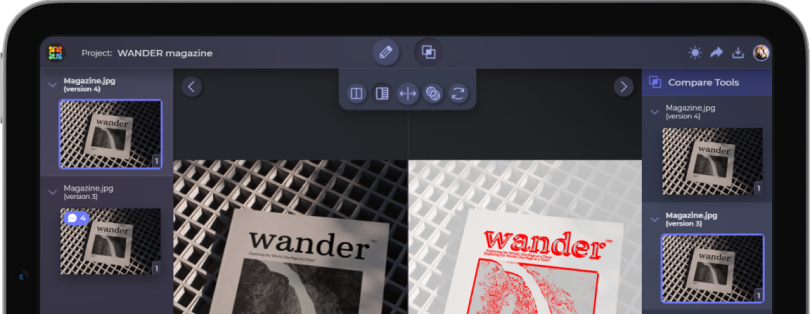
Plate-making
Plate-making is an additional step that is used in offset printing. First things first, let’s quickly understand what offset printing is.
Offset printing is a method where the ink is first applied to plates, then to a rubber blanket, and only then to paper. Even though it seems excessive, this process actually works great for large production runs because it produces the most consistent results.
But to make this possible, the printing company has to produce plates using a platemaker. A printing plate is a very thin (usually aluminum) sheet that has an image burned onto it. For a classic CMYK print, four plates are produced, one for each of the basic colors. If the design also uses spot colors, additional plates are made for those as well. Then these plates transfer inked parts onto a rubber cylinder, which in turn transfers them onto paper.

Why is this an additional step in some printing workflows? You see, making plates is expensive and adds setup time. And unless you need industrial quantities of the product, simple digital printing usually works much better. So, depending on the project, the printing company may use this process. However, for smaller projects, it is not necessary.
Final thoughts
While it seems like the file goes to heaven and back during prepress printing, all those checks are actually one of the most important parts of file preparation. A lot of steps, a lot of checks, but a result that is always worth it.
Luckily for designers, you don’t have to master every machine in the print shop. Your main objective is to prepare the file thoroughly, pay attention during prepress, and trust that the prepress team has your back. That and a trustworthy proofing software will ensure that the trip through the Styx into the real world has the smoothest sailing.