TEAM SOLUTIONS
 WORKFLOW SOLUTIONS



 REVIEW TOOL
 PROJECT MANAGEMENT
 TOOLS & INTEGRATIONS
 CLIENT INTERVIEWS




Post is also avalible in:


Laziness is the true mother of invention, and this is yet again proven by how more and more software integrates AI-powered tools. Although I’d prefer to call it optimization of the work process. Actually, 87% of CEOs admitted that AI brings more opportunities than risks to their business. I mean, who wouldn’t want to throw all the boring, mundane, and repetitive tasks at an assistant to deal with? It checks which projects are stuck in approval, assigns a review task to your designer, or pulls together a proof report that you only proofread and send to the client!
If your workflow includes Claude, ChatGPT, or any other AI tool that you usually work with separately from the main software, MCP is what you desperately need. And let me elaborate on that.
What is MCP?
Fundamentally, MCP stands for Model Context Protocol. Originally developed by Anthropic and now maintained by the Linux Foundation, it’s an open standard that defines how AI models connect to external services. It sounds technical, but the idea behind it is simple: it’s how AI agents like Claude or ChatGPT connect to your actual tools and do real work on your behalf.
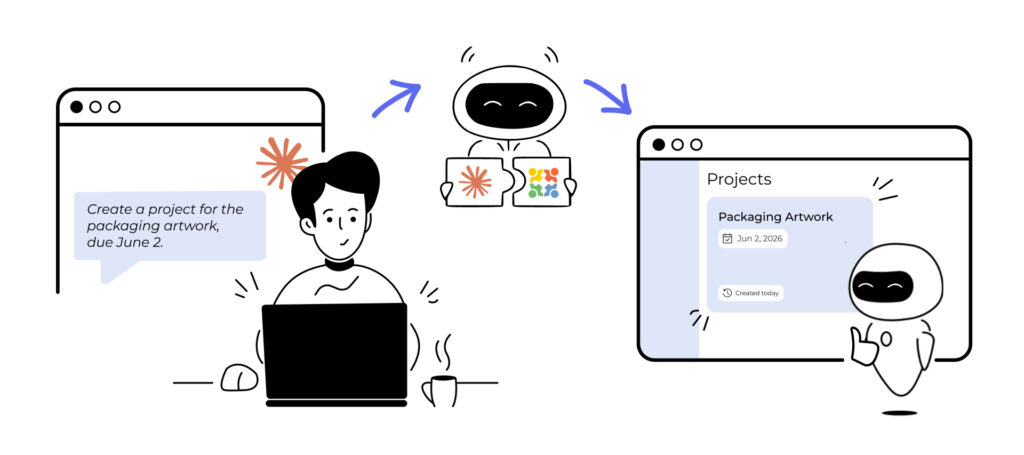
Before MCP, connecting an AI assistant to an external tool required custom, one-off integrations. Every tool had to build its own plugin for each AI platform. MCP standardizes this: if a service implements an MCP server, any MCP-compatible AI client can connect to it automatically. To put it simply, imagine that MCP is a universal adapter that lets you plug an AI tool in, no matter the software’s outlet.
Why MCP Matters for Creative Teams
I believe you’d agree that the creative review and approval process involves a lot of repetitive, context-switching tasks: creating projects, uploading files, assigning reviewers, tracking status, and generating reports. These happen dozens of times a day in busy agencies and FMCG companies.
The frustrating part isn’t that any single task is hard. It’s the constant switching. You’re in your email, then your proofing tool, then Slack, then back to email. Before you know it, half the morning is gone, and you’ve produced nothing actually creative.
For a long time, the only way to speed that up was either to hire more people or to build complex automations with a developer’s help. Neither option is particularly accessible for most teams. What MCP opens up is a third option: just ask your AI to handle it. And you don’t have to be a coder, for all it takes is a simple, conversational message from whatever AI tool you already have open. Let’s look at some examples of the prompts in the next paragraph.
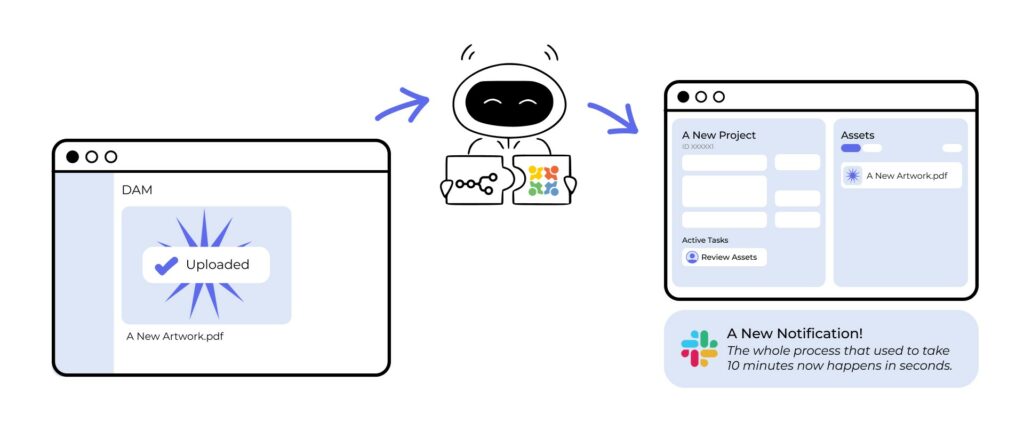
What Can You Do with the Approval Studio MCP Server?
As of March 2026, Approval Studio is the only online proofing and artwork approval platform with a native MCP server. Hence, we will base the prompt examples on the tasks you can perform within this software. For a better understanding, I’ve put up a table:
Having a native MCP server is a very different thing from a third-party workaround. What I’m implying is that the connection is obviously more reliable. It stays up to date as the platform evolves, and you’re not dependent on someone else’s tool to keep the bridge working.
Speaking of tools, though, next we’ll discuss which ones you can actually integrate into Approval Studio.
Which AI Tools Work with Approval Studio MCP?
The great news is that Approval Studio uses the open MCP standard. In other words, it means it works with any MCP-compatible AI client. To be more specific, here’s a list of some of the most popular AI clients:
- Claude Desktop and Claude.ai — Anthropic’s own clients, and the team that originally developed MCP
- ChatGPT — the classic one; OpenAI officially adopted MCP in March 2025
- n8n — the open-source AI workflow automation platform for teams who want full control over their workflows
- Make (Integromat) — popular with marketing operations teams
- Zapier — widely used in non-technical teams who want powerful automations without writing code
- Microsoft Power Automate — for teams who are mainly working with enterprise Microsoft environments
- Windsurf, Cline, Zed, and other developer tools
This means you’re not locked into a single AI tool. Set up the Approval Studio MCP server once, and it works across your entire AI stack. It’s also worth mentioning that Approval Studio’s MCP plays nicely with the existing REST and GraphQL APIs. This combination opens the way to combine traditional integrations with cutting-edge agent‑driven automation.
Ready to Try It? Connect Claude to Approval Studio
The MCP integration is live. Follow the guide that matches your setup.
MCP vs Traditional API Integration
Since both have just been mentioned, you might be wondering how MCP is different from Approval Studio’s existing REST and GraphQL APIs.

The MCP workflow, on the other hand, understands natural language. To put it to work, you don’t have to code much or go through a steep learning curve. An MCP request you make is basically just another conversational message to your usual AI chatbot.
All in all, MCP makes the power of the API accessible to everyone, not just developers. And since MCP and the API are complementary, it’s possible to use both in one workflow.
Approval Studio MCP Server Setup
One of the main benefits of MCP is that you don’t have to be especially technical to set it up. This process only takes three things: an active Approval Studio account (PRO or higher), an MCP-compatible AI client, and a bearer token from Approval Studio. It’s the same token you’d use with the REST or GraphQL API, so if you’ve already generated one, you’re halfway there.
Once you have it, you simply provide the token to whichever AI client you’re using. In MCP Server Claude Desktop, for example, you may find the configuration in Settings->Developer->Local MCP servers->Edit Config. And once you’re connected, the best first move is simply to ask a question. To do so, you can check the status of your current projects or ask about what’s due this week.
From there, you’re free to start building it into your actual workflow at whatever pace suits your team. Actually, we cover that more in-depth in our dedicated MCP setup page.

Last but not least, MCP acts on behalf of your user account. This means that every action it takes is logged in Approval Studio’s timeline and proof reports, attributed to you, just like any manual activity would be. So there’s full accountability built in, and nothing happens in the background without a trace.
Final Thoughts
At the end of the day, MCP is one of those things that sound more complicated than they actually are. The moment you get past the acronym, turns out it’s just a smarter, more natural way to interact with the tools you already use every day.
For creative teams, such as designers, account managers, packaging coordinators, and marketing ops professionals, MCP opens up a whole new way of working. With its help, you manage everything from a simple conversation, rather than switching between your AI chat and your project management or proofing tool.
The bottom line is that installing an MCP server takes five minutes and saves countless working hours. I think for a tool that requires no coding, no steep learning curve, and no developer sitting next to you, that’s a pretty good deal. What about you?