
 TEAM SOLUTIONS
 WORKFLOW SOLUTIONS



 REVIEW TOOL
 PROJECT MANAGEMENT
 TOOLS & INTEGRATIONS
 CLIENT INTERVIEWS




🌸 Spring Is Here — And So Is a Fresh New Approval Studio Release!
Yes! Yes!! Yes!!! The new version of Approval Studio is officially live! 🎉
This release brings new features, meaningful enhancements, and plenty of fixes, all designed to make your workflow smoother, clearer, and more flexible.
And the best part? A lot of what’s in this release came directly from your feedback. 💙
So let’s take a look at what’s new.
🎨 Custom Color Schemes Are Finally Here
Let’s start with one of the most requested features from our users, especially after our AppSumo campaign last year.
You asked for more control over the look and feel of Approval Studio, especially when it came to the dashboard and the Review Tool. And yes, we heard you loud and clear.
Starting with this release, you can now set up custom color schemes for both the Approval Studio dashboard and the Review Tool.
Just head over to Branding Settings and choose the colors that fit your team, your brand, and your style best.
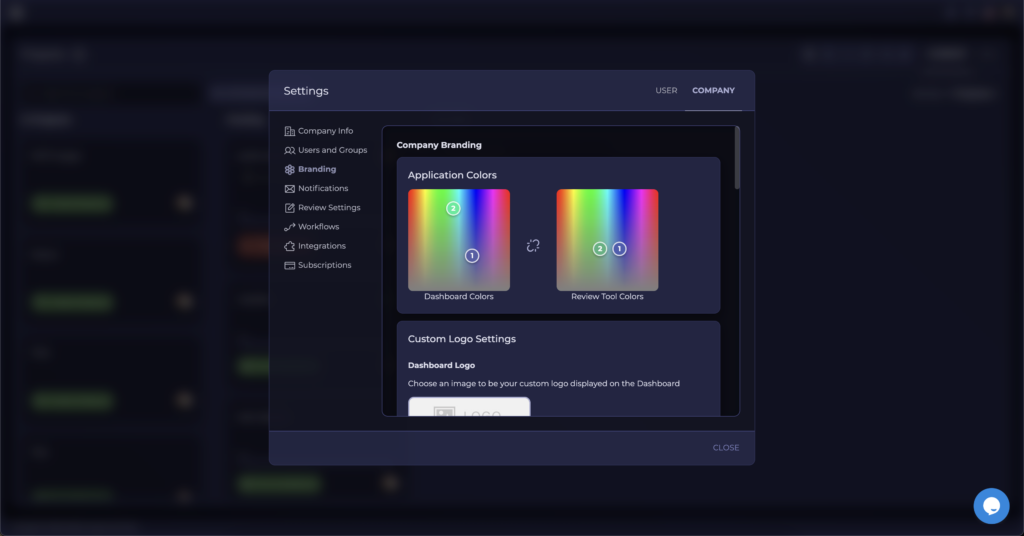
You wanted more color options – now you’ve got them. 🌈
🔁 Share Only the Latest Version
Another feature request we’ve been hearing more and more often was the ability to share only the latest version of a file.
Why? Because for some reviewers, seeing all previous versions inside the same review session can create confusion. And honestly, that makes perfect sense.
That’s why we’ve introduced a new advanced setting: Share the latest version only.
Now, even if your asset has gone through 5, 10, or 20 rounds of revisions, you can choose to send reviewers only the newest version — nothing extra, nothing distracting.
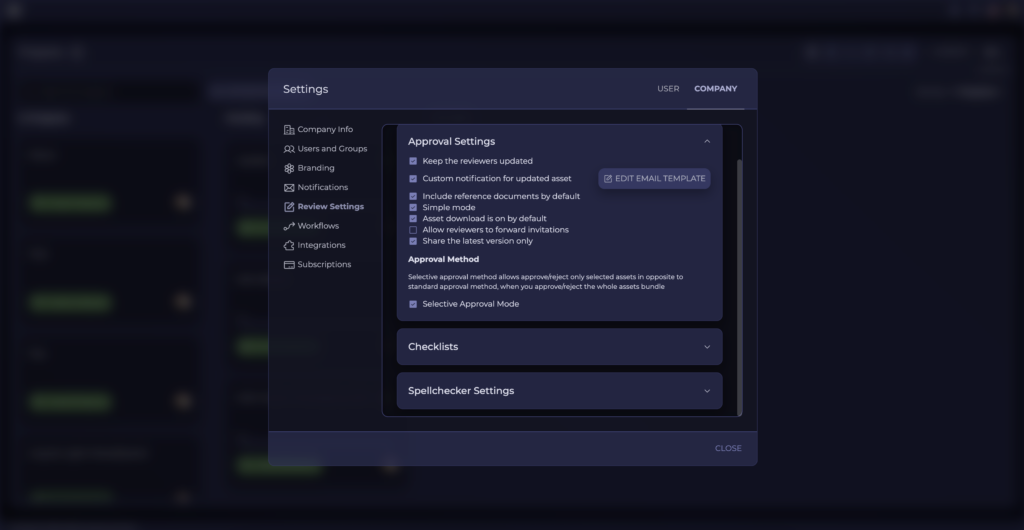
And because flexibility matters, you can either:
- set this as the default option for your whole company, or
- enable it only for specific review sessions
That’s exactly the kind of control we want you to have. ✅
🧷Reference Documents Just Got More Powerful
Usually, two major features would already make for a pretty exciting release.
But we’re not stopping there.
We’re also continuing to improve one of our newer capabilities: Reference Documents.
This feature is available in the PRO plan, and with this release, it becomes even more useful.
You can now open a reference document side by side with the asset during the review process.
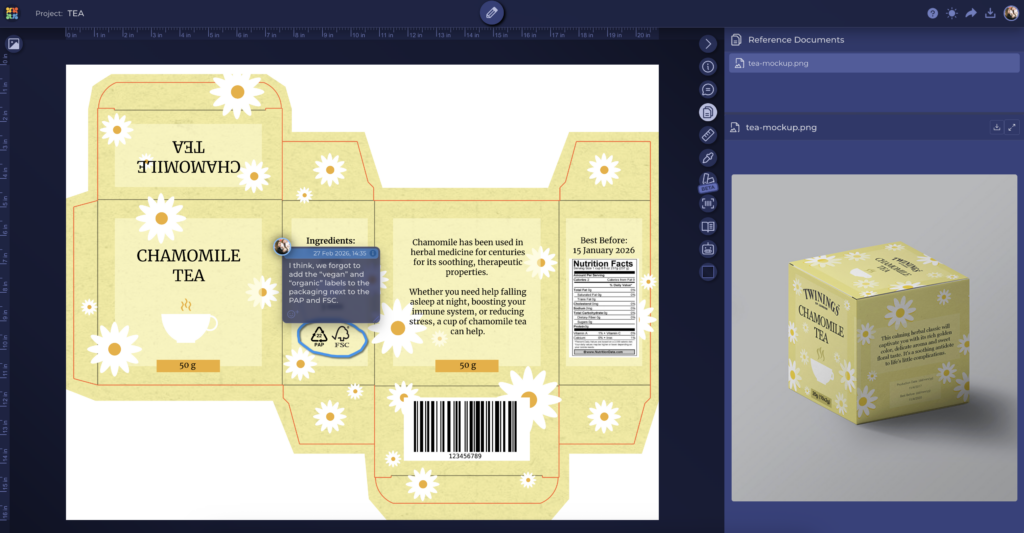
This improvement came from a very practical need: not everyone works with simple checklists. Many teams need to provide reviewers with more detailed instructions, supporting materials, visual guidelines, technical notes, or other contextual documents.
Now you can attach those reference documents when sharing an asset, and reviewers will be able to open them directly during the review session whenever they need additional context.
It’s a simple change — but one that can make a big difference in review quality and clarity. ✨
🤖 MCP Keeps Growing
And yes — we’re continuing to build out our MCP.
For those of you already exploring AI-driven workflows, this is a big one.
Approval Studio’s Model Context Protocol (MCP) allows you to connect the platform to AI tools and interact with your Approval Studio data through clients like Claude, for example.
This opens up entirely new possibilities for:
- project management
- custom reporting
- workflow automation
- AI-assisted data retrieval and analysis
And the best part: MCP is included for free in PRO and higher plans. 🚀
If you haven’t tried it yet, now is a great time to take a look.
💬Built With Your Feedback
One thing is very clear from this release: your feedback matters.
Every major improvement in this update was inspired by real users, real workflows, and real requests.
So please keep the ideas coming.
If there’s something you’d like to improve, simplify, automate, or customize in Approval Studio — let us know. We’re always listening, and many of our best features started exactly that way.
A huge thank you to everyone who has already shared feedback, suggestions, and ideas with us. 🙌🏻
And if you haven’t reached out yet – maybe this is your sign.
Who knows? Your idea might just become part of the next release. 💡
Stay creative,
The Approval Studio Team 🎉
